

ChatGPT – Bulk Delete, Archive, Export & Timestamps

Overview
A Chrome extension to bulk delete ChatGPT conversations and Navigation
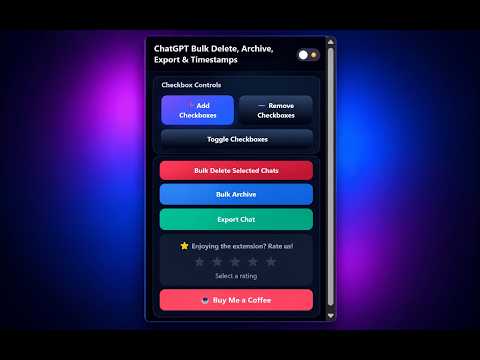
ChatGPT Bulk Delete, Archive , Export & Timestamps is a productivity-focused Chrome extension designed to help users manage their ChatGPT workspace more efficiently. If you regularly use ChatGPT for work, research, studying, or content creation, this extension helps you organize conversations faster and reduce clutter inside the ChatGPT interface. Managing large numbers of conversations manually can become slow and repetitive. This extension simplifies that process with bulk management tools and useful timestamp visibility directly within ChatGPT. ## 🚀 Core Features ### 🔹 Bulk Delete ChatGPT Conversations Easily select and delete multiple conversations at once. Instead of removing chats one by one, you can clean up your conversation history in seconds. This is especially useful for users who frequently test prompts, create drafts, or maintain many conversations daily. ### 🔹 Bulk Archive Conversations Archive multiple conversations quickly to keep your workspace organized without permanently deleting important chats. This helps users separate active conversations from older ones while maintaining a cleaner sidebar experience. ### 🔹 Conversation Timestamps View timestamps for your ChatGPT conversations directly inside the interface. This makes it easier to track activity, organize workflows, and identify recent or older chats more efficiently. ### 🔹 Seamless Integration The extension integrates naturally with the ChatGPT interface using a lightweight and minimal UI that feels native to the platform without adding unnecessary distractions. ### 🔹 Fast & Lightweight No heavy background processing or unnecessary resource usage. The extension activates only when using ChatGPT and is optimized for performance. ## ⚙️ How to Use 1. Install the extension from the Chrome Web Store 2. Open ChatGPT in your browser 3. The extension features will automatically appear inside the ChatGPT interface 4. Select multiple conversations to bulk delete or archive them instantly 5. View timestamps directly in the ChatGPT sidebar for easier organization 6. No setup, account creation, or sign-in required ## 🔐 Privacy & Security First Your privacy is a priority. * No personal data is collected * No chat content is stored, tracked, or transmitted * All actions happen locally in your browser * No external servers are used The extension only interacts with the ChatGPT website to provide conversation management features. ## 🧩 Who Is This Extension For? * Developers managing multiple prompt sessions * Students organizing research chats * Content creators handling multiple drafts * Professionals using ChatGPT daily * Anyone who wants a cleaner and more organized ChatGPT workspace ## ⚠️ Disclaimer This extension is an independent productivity tool and is not affiliated with, endorsed by, or sponsored by OpenAI. ChatGPT is a trademark of OpenAI.
4.8 out of 534 ratings
Details
- Version7.8.2
- UpdatedNovember 2, 2026
- Size2.86MiB
- LanguagesEnglish
- DeveloperWebsite
Email
akulasakethreddy@gmail.com - Non-traderThis developer has not identified itself as a trader. For consumers in the European Union, please note that consumer rights do not apply to contracts between you and this developer.
Privacy

This developer declares that your data is
- Not being sold to third parties, outside of the approved use cases
- Not being used or transferred for purposes that are unrelated to the item's core functionality
- Not being used or transferred to determine creditworthiness or for lending purposes
Support
For help with questions, suggestions, or problems, please open this page on your desktop browser