


總覽
ChatGPT sidebar as your AI assistant on any page
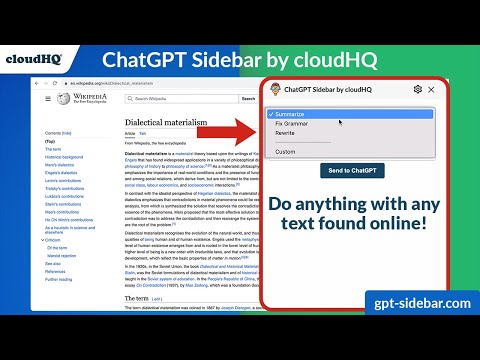
Welcome to the ChatGPT Sidebar by cloudHQ, an AI assistant that emerges from the side of any webpage you browse. As you navigate different webpages, your email inbox, or any online document, ChatGPT Sidebar can be accessed with just a click of a button. The information you get with this handy sidebar provides you with straightforward knowledge about whatever it is that you're browsing. Whether you're deciphering a dense article, exploring new topics, or just casually browsing, our ChatGPT Sidebar is designed to enrich your understanding, streamline information, and answer any queries you might have—immediately. How to use ChatGPT Sidebar? 1. Go to any website 2. Select the text 3. Click on ChatGPT Sidebar icon on the right side of your screen, select the prompt and click on "Send to ChatGPT". ~~~~ 3 Benefits of ChatGPT Sidebar by cloudHQ ~~~~ 1. Use ChatGPT prompts across websites for tasks like: ✔️ Summarize ✔️ Rewrite ✔️ Check Grammar ✔️ Translate ✔️ Clarify code ✔️ Summarize the web page ✔️ Your own prompts 2. Access our ready-to-use prompt library, where you can further customize any prompts for your own needs. 3. Full support for both ChatGPT-4 and ChatGPT-3.5 4. Full support for Open AI API 5. Full prompt management Refine your web experience with ChatGPT, and become smarter in 1 click! 🌟 cloudHQ website: https://www.cloudhq.net/ App website: https://www.gpt-sidebar.com Pricing: https://www.gpt-sidebar.com/pricing Support page: https://support.cloudhq.net/category/browser-extensions/chatgpt-sidebar/ FAQ page: https://support.cloudhq.net/chatgpt-sidebar-faq-frequently-asked-questions/ Blog: https://blog.cloudhq.net cloudHQ is trademark of cloudHQ LLC. https://www.cloudhq.net/trademark
4.5 分 (滿分 5 分)34 個評分
詳細資料
隱私權

「ChatGPT Sidebar by cloudHQ」已揭露下列關於收集及使用資料的資訊。 如需更多詳細資訊,請參閱開發人員的《privacy policy》。
ChatGPT Sidebar by cloudHQ 會處理下列資料:
這位開發者就你的資料做出下列聲明:
- 除經核准的用途外,不會將你的資料販售給第三方
- 不會基於與商品核心功能無關的目的,使用或轉移資料
- 不會為了確認信用度或基於貸款目的,使用或轉移資料
支援
如有疑問或建議,請前往開發人員的支援網站