

ChatGPT PromptFlow
1 个评分
)
概述
Supercharge Your Prompts For ChatGPT 5.2
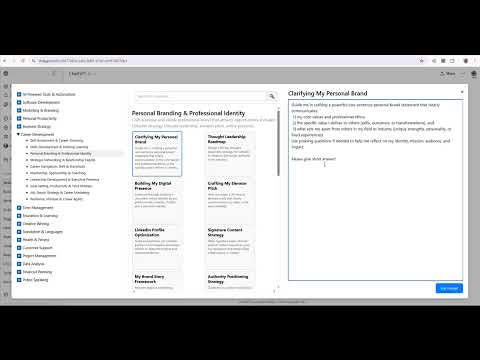
PromptFlow – Supercharge Your ChatGPT Prompts Boost your productivity and streamline your ChatGPT experience with PromptFlow, the ultimate Chrome extension for managing prompts, sessions, and creative flow. Whether you're a developer, writer, marketer, student, or everyday user, PromptFlow gives you the power to organize, reuse, and manage your prompts with ease — directly within ChatGPT’s interface. PromptFlow Key Features: ✅ Prompt Library (3-Panel UI) Browse and manage a structured library of reusable prompts categorized by topic. The library spans 16 main categories — including AI, Software Development, Marketing, Personal Productivity, Career development, Business Strategy, Health & Fitness, Translation. and more. Each main category contains 10 subtopics, and each subtopic offers 30 high-quality, ready-to-use prompts — totaling nearly 5,000 prompts across the entire library. Instantly preview, edit, or insert any prompt into ChatGPT without leaving your chat window. ✅ Prompt History (Session-Based) Track all your submitted prompts during a session and navigate them using keyboard shortcuts (Ctrl+↑/↓). Never lose a great idea again! ✅ Pin & Favorite Prompts Quickly pin your favorite or most-used prompts to access them anytime. Organize pins into your own custom categories with drag-and-drop support to easily re-organize your prompts in your categories. ✅ Search & Filter Prompts Instantly search prompts by keyword, category, or subcategory for fast access, even in large libraries. ✅ Custom Categories Create and manage your own categories to personalize your workspace and organize prompts based on projects, goals, or clients. ✅ Auto-Save & Restore Your prompt history and settings are stored locally via chrome.storage.local, ensuring privacy and persistence across sessions. ✅ Keyboard Navigation Use shortcut keys to scroll through past prompts using Ctrl + Up/Down Arrows, speeding up repetitive tasks or reference lookbacks. ✅ Smart Submit Options Choose between traditional Enter or Ctrl+Enter for submitting prompts. When Ctrl+Enter is enabled, you can freely use Enter to add new lines within your prompt — perfect for writing structured, multi-line inputs without accidentally submitting too soon. ✅ Bilingual Support (English + Arabic) Supports dual-language prompt libraries (English/Arabic), making it ideal for English as well as Arabic users. ✨ Why Use PromptFlow? - Save time by avoiding prompt repetition - Stay organized with structured prompt categories - Instantly reuse, tweak, and evolve your best ideas - Enhance ChatGPT with smart UI overlays — no redirects - Fully local-first: No data leaves your browser 🛠️ Who Is It For? - Developers & Engineers: Automate debugging, documentation, and code reviews - Researchers & Students: Manage question templates and academic workflows - Marketers & Content Creators: Maintain branding prompts and tone-of-voice tools - Professionals & Managers: Standardize communication, reporting, and brainstorming 🔒 Privacy First PromptFlow does not collect, track, or transmit any data externally. All activity is contained within ChatGPT and stored locally in your browser. 📦 Lightweight & Seamless No clutter. No performance overhead. PromptFlow feels like a natural part of ChatGPT — simply install and go. 🎯 Turn ChatGPT into your personalized productivity assistant. Try PromptFlow now and unlock your AI potential.
5 星(5 星制)1 个评分
详情
- 版本1.6.0
- 上次更新日期2026年1月15日
- 提供方Hany
- 大小901KiB
- 语言English
- 开发者ITLINKX
邮箱
hani.shafei@gmail.com - 非交易者该开发者尚未将自己标识为交易者。欧盟地区消费者须知:消费者权利可能不适用于您与该开发者达成的合约。
隐私权
该开发者已声明,您的数据:
- 不会因未获批准的用途出售给第三方
- 不会为实现与产品核心功能无关的目的而使用或转移
- 不会为确定信用度或放贷目的而使用或转移
支持
若有任何疑问、建议或问题,请在桌面浏览器中打开此页面