

ChatGPT Prompt Plus

Przegląd
ChatGPT with Prompt curated template. Quickly save and reuse prompt instant anytime.
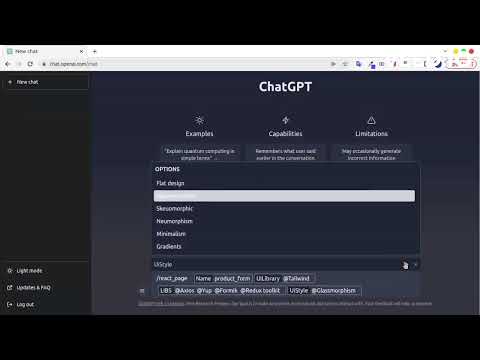
ChatGPT Prompt Plus is an extension that allows you to save and manage your prompt library, making it easy to call. You can create your prompt template with great flexibility, such as adding parameters to the template. Additionally, you can set each parameter's details, including default value and input type, enabling you to create high-quality and adaptable prompts. 🔥 Key Features: 💾 Manage prompt library and reuse it easy 🎹 Set your own hotkeys to your prompts 🗃️ Prebuilt Prompt template from awesome prompt 📂 Organize your prompts with categories and custom icons 🔍 Easy find prompt with Popup search 🧰 Bind Parameters with Prompt 🎨 Many Variant parameter type 💻 Simple and easy-to-use interface How it works: 1. Go to the prompt setting page by clicking on the hamburger icon near chat input of ChatGPT to access the main menu. Click on 'Prompt' to begin creating a new prompt template. 2. Add your prompt in prompt setting and fill your prompt detail. 3. Type a forward slash (/) in the chat input to open the prompts list menu. Select the prompt you want from the list. Click on the chosen prompt to proceed. 4. If the selected prompt is linked to a parameter, fill in the required parameter data. Enter the data into the parameter fields. Click on the 'Send icon' button to proceed and finish the process.
3,9 na 535 ocen
Szczegóły
- Wersja1.5.1.3
- Zaktualizowano13 maja 2023
- Rozmiar295KiB
- JęzykiJęzyki: 11
- DeweloperWitryna
E-mail
vilasone.phoungmixay@gmail.com - Osoba niebędąca przedsiębiorcąTen deweloper nie określił, że jest przedsiębiorcą. Pamiętaj, że prawa konsumentów nie obowiązują w przypadku umów zawartych między tym deweloperem a konsumentami z Unii Europejskiej.
Prywatność

Ten wydawca oświadcza, że Twoje dane
- nie są sprzedawane osobom trzecim (z wyjątkiem uzasadnionych przypadków)
- nie są używane ani przesyłane w celach niezwiązanych z podstawową funkcją produktu,
- nie są używane ani przesyłane w celu ustalenia zdolności kredytowej lub udzielania pożyczek.
Pomoc
Jeśli masz pytania, sugestie lub problemy, otwórz tę stronę w przeglądarce na komputerze