

ChatGPT Prompt Plus

Panoramica
ChatGPT with Prompt curated template. Quickly save and reuse prompt instant anytime.
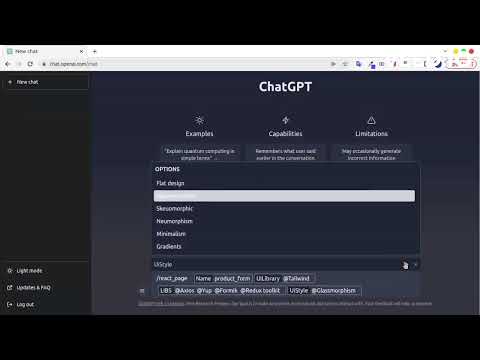
ChatGPT Prompt Plus is an extension that allows you to save and manage your prompt library, making it easy to call. You can create your prompt template with great flexibility, such as adding parameters to the template. Additionally, you can set each parameter's details, including default value and input type, enabling you to create high-quality and adaptable prompts. 🔥 Key Features: 💾 Manage prompt library and reuse it easy 🎹 Set your own hotkeys to your prompts 🗃️ Prebuilt Prompt template from awesome prompt 📂 Organize your prompts with categories and custom icons 🔍 Easy find prompt with Popup search 🧰 Bind Parameters with Prompt 🎨 Many Variant parameter type 💻 Simple and easy-to-use interface How it works: 1. Go to the prompt setting page by clicking on the hamburger icon near chat input of ChatGPT to access the main menu. Click on 'Prompt' to begin creating a new prompt template. 2. Add your prompt in prompt setting and fill your prompt detail. 3. Type a forward slash (/) in the chat input to open the prompts list menu. Select the prompt you want from the list. Click on the chosen prompt to proceed. 4. If the selected prompt is linked to a parameter, fill in the required parameter data. Enter the data into the parameter fields. Click on the 'Send icon' button to proceed and finish the process.
3,9 su 535 valutazioni
Dettagli
- Versione1.5.1.3
- Ultimo aggiornamento:13 maggio 2023
- Dimensioni295KiB
- Lingue11 lingue
- SviluppatoreSito web
Email
vilasone.phoungmixay@gmail.com - Non commercianteQuesto sviluppatore non si è identificato come commerciante. Per quanto riguarda i consumatori nell'Unione Europea, tieni presente che i diritti del consumatore non sono applicabili ai contratti stipulati tra te e questo sviluppatore.
Privacy

Questo sviluppatore dichiara che i tuoi dati:
- Non vengono venduti a terze parti, se non per i casi d'uso approvati.
- Non vengono usati o trasferiti per finalità non correlate alle funzionalità principali dell'elemento.
- Non vengono usati o trasferiti per stabilire l'affidabilità creditizia o per finalità di prestito.
Assistenza
Per ricevere assistenza in merito a domande, suggerimenti o problemi, apri questa pagina nel browser desktop