


개요
ChatGPT with Prompt curated template. Quickly save and reuse prompt instant anytime.
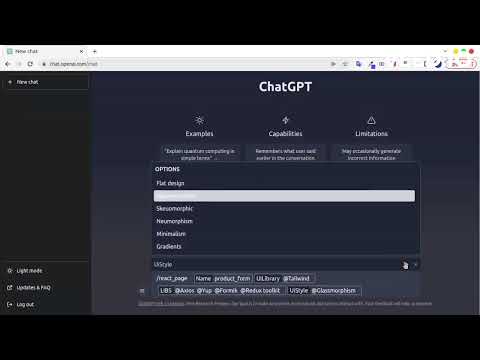
ChatGPT Prompt Plus is an extension that allows you to save and manage your prompt library, making it easy to call. You can create your prompt template with great flexibility, such as adding parameters to the template. Additionally, you can set each parameter's details, including default value and input type, enabling you to create high-quality and adaptable prompts. 🔥 Key Features: 💾 Manage prompt library and reuse it easy 🎹 Set your own hotkeys to your prompts 🗃️ Prebuilt Prompt template from awesome prompt 📂 Organize your prompts with categories and custom icons 🔍 Easy find prompt with Popup search 🧰 Bind Parameters with Prompt 🎨 Many Variant parameter type 💻 Simple and easy-to-use interface How it works: 1. Go to the prompt setting page by clicking on the hamburger icon near chat input of ChatGPT to access the main menu. Click on 'Prompt' to begin creating a new prompt template. 2. Add your prompt in prompt setting and fill your prompt detail. 3. Type a forward slash (/) in the chat input to open the prompts list menu. Select the prompt you want from the list. Click on the chosen prompt to proceed. 4. If the selected prompt is linked to a parameter, fill in the required parameter data. Enter the data into the parameter fields. Click on the 'Send icon' button to proceed and finish the process.
5점 만점에 3.8점평점 36개
세부정보
개인정보 보호

개발자가 사용자 데이터에 관해 다음과 같이 선언했습니다
- 승인된 사용 사례를 제외하고 서드 파티에 판매하지 않음
- 항목의 핵심 기능과 관련 없는 목적으로 사용하거나 전송하지 않음
- 신용도 판단 또는 대출 목적으로 사용하거나 전송하지 않음
지원
질문, 제안 또는 문제와 관련하여 도움이 필요하면 데스크톱 브라우저에서 이 페이지를 여세요.