


Overview
One-click AI prompt generator, plus Context Snapshots: save any chat and continue it in another AI. Inside ChatGPT, Claude and more.
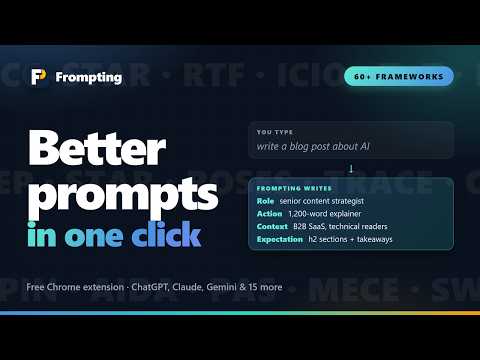
Your AI chat forgets. Frompting doesn't. Hit the message limit on a free plan, three hours into a project? Type f/save, open another AI, type f/load — and carry on with every message, every document and every decision intact. That is Context Snapshots, and it is free. The same small button beside the chat box turns whatever you typed into a properly structured prompt, built on a real prompt engineering framework, in one click. Inside ChatGPT, Claude and Gemini, and 15 more AI sites. Nothing to copy between tabs. ⚡ WHAT YOU GET, IN TEN SECONDS ✓ Context Snapshots — save a whole conversation, continue it in any AI ✓ Enhance — one click, a structured prompt on one of 60+ frameworks ✓ Refine — say what to change, from the panel or straight from the page ✓ f/ commands — f/save, f/load, f/prompt, f/enhance, right in the chat box ✓ Saved prompts, favourites and history — nothing you write gets lost ✓ Works where you already chat — 18 AI sites built in, add any other in a click ━━━━━━━━━━━━━━━━━━━━━━━━━━━━━━━━━━━━━━━━ 📸 CONTEXT SNAPSHOTS — SAVE A CONVERSATION, CONTINUE IT ANYWHERE ━━━━━━━━━━━━━━━━━━━━━━━━━━━━━━━━━━━━━━━━ Every AI chat forgets. It hits a limit, it gets too long, it lives on one site. A snapshot takes the whole conversation out of the page and makes it a file on your device that any AI can pick up from. How it works 1. Type f/save in the chat you want to keep. Every message is captured in order, attached documents are converted to text and placed where they were attached, pictures are carried along. 2. Open any other chat — a fresh one on the same site, or a different AI. 3. Type f/load, pick the snapshot, add your question, send. The AI reads it as context and carries on where the last one stopped. When you will want it → Your free allowance runs out mid-project. Save, open another AI you have, load, carry on. You lose nothing but the tab. → The chat got so long the AI forgot what you agreed early on. Save, open a fresh chat, load: the whole history in one clean file. → Draft in one AI, review in another — with the brief and the reasoning, not just the final text. → Build a reusable context pack: one conversation establishing your company, product and voice, loaded at the start of every new chat. → Hand a conversation to a colleague as a plain Markdown file, or keep a record of the chats that matter, attachments included. ✓ Free on every plan — saving and loading ✓ f/save is built and verified on ChatGPT and Claude, and on Gemini, Perplexity and Grok; f/load, f/prompt and f/enhance work on every site the extension runs on ✓ Saved on your device, never uploaded to us ✓ Premium adds a library: browse, search inside, read and download every snapshot, with a sync folder that Chrome, Edge and Brave share ━━━━━━━━━━━━━━━━━━━━━━━━━━━━━━━━━━━━━━━━ ✨ ENHANCE — ONE CLICK, A REAL FRAMEWORK ━━━━━━━━━━━━━━━━━━━━━━━━━━━━━━━━━━━━━━━━ Write your idea however it comes out, then press the button. ✓ It reads what you typed and suggests the frameworks that fit: RACE, CO-STAR, TRACE and 60 more, grouped by the kind of work. Pick one, or turn frameworks off for a plain rewrite. ✓ The prompt streams in as it is written, then drops straight into the chat box. Nothing is sent to the AI until you press send. ✓ Bracketed gaps like [TARGET AUDIENCE] mark the facts only you know. Click a gap and choose from suggestions read out of the prompt itself, or type your own. ✓ Fine-tune the target AI, tone, length and format — or leave them on Auto and the engine decides. ━━━━━━━━━━━━━━━━━━━━━━━━━━━━━━━━━━━━━━━━ 🔁 REFINE — SAY WHAT TO CHANGE ━━━━━━━━━━━━━━━━━━━━━━━━━━━━━━━━━━━━━━━━ ✓ In the panel: Refine takes an instruction — shorter, add a table, more formal — and rewrites the prompt in place, keeping the framework intact and the previous version to go back to. ✓ From the page: once a prompt is already in the chat box, Quick Refine opens beside it with suggestion chips read from your actual prompt. Pick one or type a change; the rewrite replaces what is in the box. ━━━━━━━━━━━━━━━━━━━━━━━━━━━━━━━━━━━━━━━━ ⌨️ THE f/ COMMANDS ━━━━━━━━━━━━━━━━━━━━━━━━━━━━━━━━━━━━━━━━ Type f/ at the end of what is in the chat box and a menu appears. Arrow keys to move, Enter to choose, keep typing to filter. f/save — save this conversation as a snapshot f/load — insert a saved snapshot here f/prompt — insert one of your saved or favourite prompts f/enhance — turn what you have typed into a better prompt (your text first, then the command) ━━━━━━━━━━━━━━━━━━━━━━━━━━━━━━━━━━━━━━━━ 🔖 SAVED PROMPTS, FAVOURITES AND HISTORY ━━━━━━━━━━━━━━━━━━━━━━━━━━━━━━━━━━━━━━━━ ✓ Everything you generate is kept on your device and searchable from the history button. Ask for the same thing twice and the saved result comes back instead of spending another generation. ✓ Star a prompt and it becomes a favourite you can insert by name with f/prompt. ✓ Premium also saves prompts to your account, so they are on your other machines and in your dashboard on the website. ━━━━━━━━━━━━━━━━━━━━━━━━━━━━━━━━━━━━━━━━ 🖼️ IMAGE AND VIDEO PROMPTS (Premium) ━━━━━━━━━━━━━━━━━━━━━━━━━━━━━━━━━━━━━━━━ ✓ Image: style, aspect ratio, quality, lighting, shot type and negatives. Midjourney's parameter syntax is written for you; generators that read a plain negative line get one instead, and the ones that treat negatives as things to include get none. ✓ Video: labelled sections — subject, action, camera, lighting, motion — which is what video generators follow most reliably. ✓ A prompt that names a real person or a trademarked character is rewritten around an original one that image and video tools will accept, changing as little as possible about everything else you asked for. ━━━━━━━━━━━━━━━━━━━━━━━━━━━━━━━━━━━━━━━━ 🎨 BRAND KIT (Premium) ━━━━━━━━━━━━━━━━━━━━━━━━━━━━━━━━━━━━━━━━ Save your voice, audience and rules once and they are applied to every prompt you enhance. A visual kit keeps the same character and style across a series of images or videos. ━━━━━━━━━━━━━━━━━━━━━━━━━━━━━━━━━━━━━━━━ 🌐 WORKS WHERE YOU ALREADY CHAT ━━━━━━━━━━━━━━━━━━━━━━━━━━━━━━━━━━━━━━━━ The button appears automatically on the major AI chat sites, including ChatGPT, Claude and Gemini, and on fifteen others. Using something that is not covered? Open the toolbar popup and press "Enable here" to add it yourself. The gear beside the button holds your account and remaining prompts, shortcuts into the web app, your snapshot library, and every command with a full description and an example. Drag the buttons anywhere; they stay put per site. ━━━━━━━━━━━━━━━━━━━━━━━━━━━━━━━━━━━━━━━━ 💳 WHAT IT COSTS ━━━━━━━━━━━━━━━━━━━━━━━━━━━━━━━━━━━━━━━━ Free to try with no account: 3 prompts a day, 15 a week. A free account gets 6 a day and 30 a week. Context Snapshots — saving and loading — are free for everyone. Premium is 1,500 prompts a day and adds all 60+ frameworks, image and video modes, Brand Kit, prompts saved to your account, and the snapshot library. ━━━━━━━━━━━━━━━━━━━━━━━━━━━━━━━━━━━━━━━━ 🔒 PRIVACY ━━━━━━━━━━━━━━━━━━━━━━━━━━━━━━━━━━━━━━━━ The extension reads what you type in the chat box only when you press Enhance, a refine, or an f/ command — never on its own. The text you ask it to enhance is the only thing sent to our server. A snapshot is saved on your device and never uploaded to us; when you load one, it goes to the AI site you are on as a file you attach, the same as dragging it in yourself. No browsing history is read, nothing runs on sites you have not enabled, and no AI API keys are stored. Full policy: https://frompting.com/privacy Frompting is an independent tool and is not affiliated with, endorsed by, or sponsored by OpenAI. ChatGPT is a trademark of OpenAI. 📖 The complete guide, with a screenshot of every part: https://frompting.com/extension-guide
0 out of 5No ratings
Details
- Version1.19.0
- UpdatedSeptember 16, 2026
- FeaturesOffers in-app purchases
- Size811KiB
- LanguagesEnglish (United States)
- DeveloperWebsite
Email
frompting@gmail.com - Non-traderThis developer has not identified itself as a trader. For consumers in the European Union, please note that consumer rights do not apply to contracts between you and this developer.
Privacy

ChatGPT Prompt Generator — Frompting has disclosed the following information regarding the collection and usage of your data. More detailed information can be found in the developer's privacy policy.
ChatGPT Prompt Generator — Frompting handles the following:
This developer declares that your data is
- Not being sold to third parties, outside of the approved use cases
- Not being used or transferred for purposes that are unrelated to the item's core functionality
- Not being used or transferred to determine creditworthiness or for lending purposes
Support
For help with questions, suggestions, or problems, visit the developer's support site