

ChatGPT Prompt Buttons – One‑Click Automation, Smart Tags & Quick Actions
4 ratings
)
Overview
Add one-click actions to ChatGPT with smart tags for instant summaries, rewrites, expansions, and custom automations.
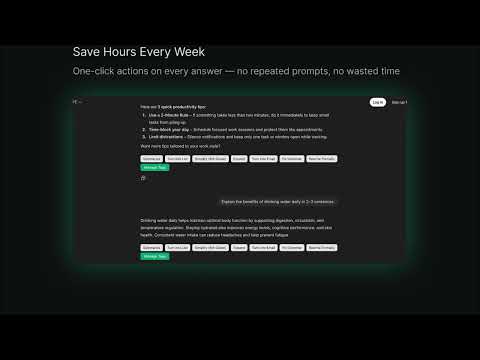
✨ Transform ChatGPT Into a One-Click Productivity Machine ChatGPT Prompt Buttons adds smart, customizable action buttons under every ChatGPT response — letting you summarize, rewrite, simplify, expand, or format content instantly. No typing. No re-entering prompts. No copy-paste. Just click → transform → done. Perfect for students, writers, marketers, researchers, and anyone who wants ChatGPT to work faster and smarter — with zero friction. 🔥 Key Features ⚡ Instant One-Click Actions (Built-In Smart Tags) Right out of the box, you get 5 powerful quick-action buttons: * Summarize — quick TL;DR * Turn Into a List — clean bullet points * Simplify (8th Grade) — easier-to-read version * Expand — add depth & detail * Turn Into Email — polished email format All actions automatically pull the previous ChatGPT response and improve it instantly. 🧩 Create Your Own Custom Tags Build unlimited personalized one-click actions: * Add your own label + instruction * Edit tags with a double-click * Delete with one tap * Auto-saves everything locally Examples you can create: * “Explain Like I’m 5” * “Rewrite More Persuasively” * “Translate to Spanish” * “SEO-Optimize This” Your workflow → 1 click. 🔄 Smart Automation Behind the Scenes Every button automatically: 1. Grabs the previous ChatGPT answer 2. Builds an improved prompt using your instruction 3. Inserts it directly into ChatGPT 4. Dispatches input events 5. Auto-submits the message Feels like ChatGPT got built-in editing superpowers. 🧠 Automatic Button Injection on New Messages Whenever ChatGPT replies, your smart tag buttons appear instantly, without refreshing. No setup. No effort. Just always-ready quick actions. 💨 Lightweight, Fast & Privacy-Safe * 100% local * No accounts * No APIs * No data sent anywhere * Zero performance impact Feels native inside ChatGPT — clean, small, simple, and powerful. 🎯 Perfect For * Students & researchers * Writers & content creators * Marketers & SEO professionals * Customer support teams * Productivity enthusiasts * Anyone who hates retyping prompts If you summarize, rewrite, or adjust tone often — this will save you hours. 💡 Why ChatGPT Prompt Buttons Outshines the Others Unlike big prompt libraries or heavy management dashboards, this extension is: ✔ Tiny but powerful ✔ Instant to use ✔ Zero complexity ✔ Designed for real everyday tasks ✔ Fully customizable ✔ One-click, not multi-step It gives you speed, not clutter. 📝 How It Works 1. Install the extension 2. Open ChatGPT 3. See action buttons appear under every message 4. Click a button → watch ChatGPT transform your text instantly 5. Add your own custom tags anytime Simple. Fast. Magical. 🛡️ Privacy Your custom tags are saved only in your browser’s local storage. No data is uploaded or shared. 🎉 Upgrade Your ChatGPT Workflow Today Turn ChatGPT into a one-click writing, editing, and transformation engine — and save hours every week.
5 out of 54 ratings
Details
- Version1.0.0
- UpdatedNovember 25, 2025
- Offered bySalaria Labs
- Size1.17MiB
- LanguagesEnglish
- Developer
Email
salaria.labs@gmail.com - Non-traderThis developer has not identified itself as a trader. For consumers in the European Union, please note that consumer rights do not apply to contracts between you and this developer.
Privacy

This developer declares that your data is
- Not being sold to third parties, outside of the approved use cases
- Not being used or transferred for purposes that are unrelated to the item's core functionality
- Not being used or transferred to determine creditworthiness or for lending purposes