

ChatGPT Power - Supercharge ChatGPT
1 rating
)
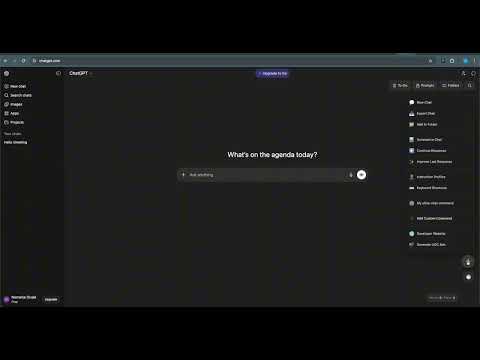
Overview
Folders, search, export, prompt library, and productivity tools for ChatGPT
ChatGPT Power supercharges your ChatGPT experience with powerful organization, productivity, and export features. ORGANIZE YOUR CONVERSATIONS - Create folders to organize your ChatGPT conversations - Drag and drop chats between folders - Bulk move multiple conversations at once - Pin important folders for quick access - Search across all your conversations instantly PROMPT LIBRARY - Save your favorite prompts for reuse - Organize prompts in categories - Quick insert prompts with one click - Import/export your prompt collection EXPORT CONVERSATIONS - Export chats as Markdown, PDF, or plain text - Copy entire conversations to clipboard - Share conversations with formatted output - Preserve code blocks and formatting PRODUCTIVITY TOOLS - Pomodoro timer for focused work sessions - Word and character counter - Auto-save draft feature - Quick actions menu for common tasks - Keyboard shortcuts for power users TO-DO LIST - Built-in task manager - Pin important tasks - Archive completed items - Drag and drop to reorder CUSTOMIZATION - Light and dark theme support - Adapts to ChatGPT's interface - Clean, non-intrusive design KEYBOARD SHORTCUTS - Ctrl+B: Toggle folders sidebar - Ctrl+Shift+F: Search conversations - /: Quick prompts menu PRIVACY FOCUSED - All data stored locally in your browser - No external servers or tracking - Your conversations stay private Transform your ChatGPT into a productivity powerhouse. Perfect for researchers, developers, writers, and anyone who uses ChatGPT daily.
5 out of 51 rating
Details
- Version1.0.1
- UpdatedJanuary 14, 2026
- FeaturesOffers in-app purchases
- Offered byNitrotech
- Size108KiB
- LanguagesEnglish (United States)
- Developer
Email
contact@nitrotech.app - Non-traderThis developer has not identified itself as a trader. For consumers in the European Union, please note that consumer rights do not apply to contracts between you and this developer.
Privacy

ChatGPT Power - Supercharge ChatGPT has disclosed the following information regarding the collection and usage of your data. More detailed information can be found in the developer's privacy policy.
ChatGPT Power - Supercharge ChatGPT handles the following:
This developer declares that your data is
- Not being sold to third parties, outside of the approved use cases
- Not being used or transferred for purposes that are unrelated to the item's core functionality
- Not being used or transferred to determine creditworthiness or for lending purposes
Support
For help with questions, suggestions, or problems, visit the developer's support site