


概述
This is a Chrome extension that simplifies event scheduling using natural language input right from your browser.
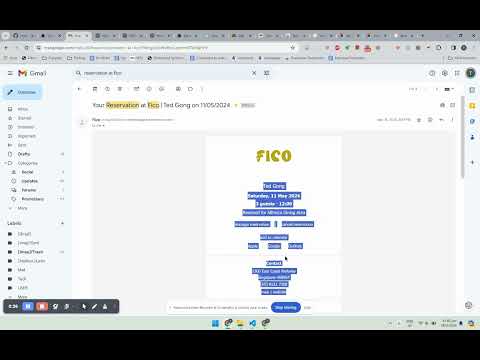
Stop manually copying and pasting event details! ChatGPT for Google Calendar is the smartest Chrome extension for adding events to your Google Calendar directly from any webpage. ✨ Transform Text into Events: Simply select text containing event details (like "Team meeting Thursday 3 PM Zoom") on any website. 🚀 Right-Click & Go: Right-click the selected text and choose "Add to Calendar". 🧠 AI-Powered Parsing: Our extension intelligently extracts the title, date, time, and location using advanced AI. 📅 Pre-fills Google Calendar: Instantly opens a pre-filled Google Calendar event creation page in a new tab. Just review, tweak if needed, and save! ⏳ Know It's Working: A full-page spinner shows you when the AI is processing your request. ❗ Clear Error Feedback: If something goes wrong (like unclear text or an AI issue), you'll see a helpful error message directly on the page for 3 seconds. Why You'll Love ChatGPT for Google Calendar * Save Serious Time: Schedule events in seconds, not minutes. * Effortless Scheduling: Works seamlessly while you browse. * Reduce Typos: AI helps capture details accurately. * Universal Compatibility: Add events from emails, articles, project plans, and more. Getting Started (Easy!): 1. Install: Add the extension from the Chrome Web Store. 2. Select & Schedule: Highlight text on any page, right-click, and select "Add to Calendar". 3. Confirm & Save: Review the pre-filled event in Google Calendar and click "Save". Install ChatGPT for Google Calendar today and streamline your Google Calendar scheduling!
2.9 星(5 星制)8 个评分
详情
隐私权

该开发者已声明,您的数据:
- 不会因未获批准的用途出售给第三方
- 不会为实现与产品核心功能无关的目的而使用或转移
- 不会为确定信用度或放贷目的而使用或转移
支持
若有任何疑问、建议或问题,请访问开发者的支持网站