

ChatGPT for Gmail
1 个评分
)
概述
Your Email Generator for Gmail
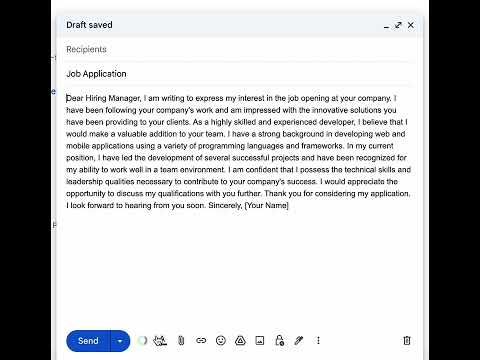
ChatGPT for Gmail is a chrome browser extension that generate email based on Email Subject or content in case of reply and directly insert into editor. *How to Use 1. Write Subject and click on ChatGPT for Gmail icon. 2. In case of Reply, click on 'More' icon and select reply using ChatGPT. -----FAQ:----- 1. What is ChatGPT? ChatGPT is a large language model developed by OpenAI. It is an artificial intelligence tool that is trained on a massive amount of text data and uses deep learning techniques to generate natural language responses to user queries. The name "GPT" stands for "Generative Pre-trained Transformer," which refers to the type of deep learning architecture used to train the model. ChatGPT is capable of answering a wide range of questions on various topics and engaging in natural language conversations with users. It is designed to continuously learn and improve over time, allowing it to provide increasingly accurate and informative responses. 2. What is ChatGPT for Gmail? ChatGPT for Gmail is a chrome browser extension that generate email based on Email Subject and directly insert into editor. 3. Is ChatGPT for Gmail free to use? Yes, the extension is free to use. 5. Do I need a ChatGPT/OpenAI account? Yes, you need to have a ChatGPT account to use this extension. You can create an account for free at chat.openai.com.
5 星(5 星制)1 个评分
详情
- 版本1.0.1
- 上次更新日期2023年3月7日
- 提供方developershubh23
- 大小1.74MiB
- 语言English (United States)
- 开发者
邮箱
developershubh23@gmail.com - 非交易者该开发者尚未将自己标识为交易者。欧盟地区消费者须知:消费者权利可能不适用于您与该开发者达成的合约。
隐私权
该开发者已声明,您的数据:
- 不会因未获批准的用途出售给第三方
- 不会为实现与产品核心功能无关的目的而使用或转移
- 不会为确定信用度或放贷目的而使用或转移
支持
若有任何疑问、建议或问题,请在桌面浏览器中打开此页面