


개요
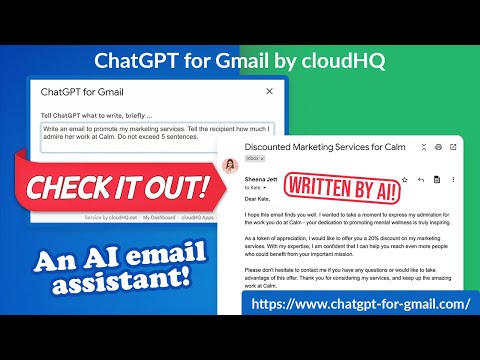
Automatically write emails using ChatGPT for Gmail
🚀 Supercharge Your Email Game with ChatGPT for Gmail! 🚀 Introducing the ultimate Chrome extension for Gmail that revolutionizes the way you write emails! Unleash the power of cutting-edge AI technology to elevate your communication skills and make every email count. 🌟 What's in store for you? 🌟 🔥 AI-Powered Email Composer: Generate entire emails and messages using the groundbreaking OpenAI AI, meticulously crafted to work seamlessly with Gmail. 🎯 Key Functions Tailored for You: ✅ Instant Grammar Guru: Say goodbye to embarrassing typos! ChatGPT intelligently checks and edits your grammar on the fly. ✅ Context-Smart Replies: Create contextually appropriate responses for any email you receive, boosting your efficiency and professionalism. ✅ Effortless Outreach: Generate persuasive and engaging outreach emails from scratch, making connections easier than ever. 🌠 Exclusive Features: ✅ Privacy-First AI: ChatGPT for Gmail respects your privacy, ensuring your data stays safe and secure. ✅ Unparalleled Quality: Experience the finest responses, outshining all other natural language processing AIs in the market. ✅ Gmail-Optimized: Enjoy a seamless integration with Gmail, designed for your convenience. ✅ Multilingual Magic: Break language barriers with support for all languages, empowering global communication. 🎉 Download ChatGPT for Gmail now and experience email mastery like never before! 🎉 ~~~How to use it~~~ 1. Go to https://chat.openai.com/chat and create an account. 2. Install this extension. 3. Open Gmail and compose a new email. 4. Click on the "ChatGPT for Gmail" icon and enter your ChatGPT prompt to complete your email message. You can also type @chatgpt 5. If you are satisfied with the message, simply click on send. Additional Features: Text Enhancement: Simply select any text in your email, right-click to access the context menu, and choose options like "Fix Grammar" or "Summarize" for instant improvements. Smart Reply Assistance: Click on our extension's icon adjacent to the 'Reply' button to access a variety of response prompts. For instance, select "Answer to the Best of Your Knowledge" for AI-assisted responses tailored to the email's content. Custom Prompts: Personalize your experience by adding your own prompts. To do this, click on our extension icon located in the top-right corner of your browser. ~~~FAQ~~~ Q: What is ChatGPT for Gmail? A: It's an extension that integrates OpenAI with Gmail to assist in drafting and replying on emails. Q: What are the requirements to use it? A: A valid OpenAI account is necessary. Go to https://chat.openai.com/chat and create an account. Q: What functions does it offer? A: Creating or replying to emails, correcting grammar and spelling, enhancing or rewriting text, and sending instructions to ChatGPT directly. It also includes prompt library. Q: How does it help draft emails? A: Through writing suggestions, automated responses, and grammar and spell checking. Q: Can I use my own API key with it? A: Yes, you can use your own OpenAI API key. Q: Can I use my own fine-tuned model? A: Yes, you can use your fine-tuned model. Please contact us to help you setup a system to create a fine-tuned model. Q: How can I create a library of prompts? A: Yes. You can use Gmail Snippets by cloudHQ extension to create shortcuts for prompts. You can also customize context prompts and auto-reply prompts. cloudHQ website: https://www.cloudhq.net/ App website: https://www.chatgpt-for-gmail.com/ Pricing: https://www.chatgpt-for-gmail.com/pricing Support page: https://support.cloudhq.net/category/browser-extensions/chatgpt-for-gmail/ FAQ page: https://support.cloudhq.net/google-chatgpt-faq-frequently-asked-questions/ Blog: https://blog.cloudhq.net Gmail, Google Calendar, and Google Workspace are trademarks of Google LLC. Use of these trademarks is subject to Google Permissions. cloudHQ is trademark of cloudHQ LLC. https://www.cloudhq.net/trademark
5점 만점에 4.4점평점 45개
세부정보
개인정보 보호

ChatGPT for Gmail by cloudHQ에서 데이터 수집 및 사용과 관련하여 다음 정보를 공개했습니다. 더 자세한 정보는 개발자의 privacy policy을 참고하세요.
ChatGPT for Gmail by cloudHQ 항목은 다음을 처리합니다.
개발자가 사용자 데이터에 관해 다음과 같이 선언했습니다
- 승인된 사용 사례를 제외하고 서드 파티에 판매하지 않음
- 항목의 핵심 기능과 관련 없는 목적으로 사용하거나 전송하지 않음
- 신용도 판단 또는 대출 목적으로 사용하거나 전송하지 않음
지원
질문, 제안 또는 문제와 관련하여 도움이 필요하시면 개발자의 지원 사이트를 방문하세요.