Item logo image for ChatGPT Folders, Timestamp, Bookmarks, Bulk-Actions - GPT Master Toolkit

ChatGPT Folders, Timestamp, Bookmarks, Bulk-Actions - GPT Master Toolkit

gptmaster.app
Featured
4.7(

18 ratings

)
ExtensionTools1,000 users
Item media 4 (screenshot) for ChatGPT Folders, Timestamp, Bookmarks, Bulk-Actions - GPT Master Toolkit
Item media 5 (screenshot) for ChatGPT Folders, Timestamp, Bookmarks, Bulk-Actions - GPT Master Toolkit
Item video thumbnail
Item media 2 (screenshot) for ChatGPT Folders, Timestamp, Bookmarks, Bulk-Actions - GPT Master Toolkit
Item media 3 (screenshot) for ChatGPT Folders, Timestamp, Bookmarks, Bulk-Actions - GPT Master Toolkit
Item media 4 (screenshot) for ChatGPT Folders, Timestamp, Bookmarks, Bulk-Actions - GPT Master Toolkit
Item media 5 (screenshot) for ChatGPT Folders, Timestamp, Bookmarks, Bulk-Actions - GPT Master Toolkit
Item video thumbnail
Item media 2 (screenshot) for ChatGPT Folders, Timestamp, Bookmarks, Bulk-Actions - GPT Master Toolkit
Item video thumbnail
Item media 2 (screenshot) for ChatGPT Folders, Timestamp, Bookmarks, Bulk-Actions - GPT Master Toolkit
Item media 3 (screenshot) for ChatGPT Folders, Timestamp, Bookmarks, Bulk-Actions - GPT Master Toolkit
Item media 4 (screenshot) for ChatGPT Folders, Timestamp, Bookmarks, Bulk-Actions - GPT Master Toolkit
Item media 5 (screenshot) for ChatGPT Folders, Timestamp, Bookmarks, Bulk-Actions - GPT Master Toolkit

Overview

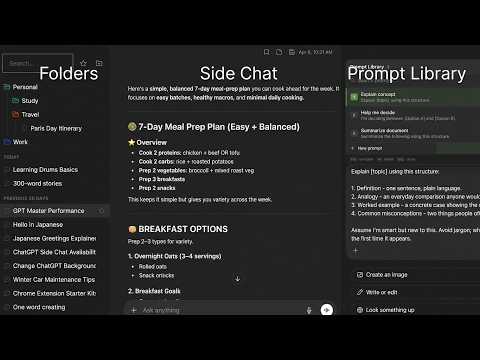
Organize ChatGPT with folders, stars, timestamps, minimap, and follow-up suggestions. Navigate long chats & save time.

Add ChatGPT folders, bookmarks, and timestamps to organize ChatGPT the way you actually work. GPT Master is the organizational layer ChatGPT never built - folders, stars, message bookmarks, timestamps, follow-up suggestions, minimap, and search in one lightweight extension. FEATURES 🗂️ ChatGPT Folders - Create folders and nested subfolders to organize ChatGPT by project, client, or topic - Assign custom colors for fast visual scanning - Drag and drop conversations between folders - Rename, delete, and restructure anytime - Expand or collapse all folders at once from the context menu - Add child folders directly from any folder's context menu ⭐ ChatGPT Stars & Pins - Star important threads for one-click retrieval - stop scrolling to find what matters - Dedicated starred section in the sidebar - Filter to show only starred conversations 🔖 ChatGPT Bookmarks - Bookmark specific messages within conversations - Jump back to any bookmarked message from the sidebar ⏰ ChatGPT Timestamps - See exactly when each message was sent - know when ideas happened - Relative time for recent messages ("just now", "5m ago") - Absolute timestamps for older messages 📝 Notes & Highlights - Write notes on any conversation and bookmark key passages - Keep notes docked in the right rail for quick reference while chatting - Organize your thoughts alongside your conversations 🏷️ Conversation Tags - Tag conversations with custom labels to group them across folders - Filter the sidebar by tag for instant context switching - Manage tags in Admin Hub: rename, recolor, and delete in bulk ⚡ Speed Booster - Keeps long conversations fast by only rendering nearby messages - Cuts memory use in threads with hundreds of exchanges - Enable or disable in Admin Hub under Performance 💬 Smart Follow-Up Suggestions - AI-generated follow-up prompts appear after each response - One click to keep the conversation going - no more staring at a blank prompt - Suggestions always available, even offline - Enhanced follow-up delivery is resilient, with graceful fallback when network requests fail 🗺️ Conversation Minimap - Visual table of contents for long conversations - stop scrolling through 50+ messages - Jump to any section with one click 🔍 Search - Search conversations by title and content - Filter by folder or star status 📦 Bulk Actions - Multi-select conversations for batch move, archive, or star 🧭 Conversation Context Menu - Right-click any conversation for quick actions: Copy Link, Move to Folder, Add Note, and View Details - Conversation Details panel shows title, model, message count, folder, creation date, and starred status BUILT FOR POWER USERS - Changes sync instantly across all open ChatGPT tabs - Rename and archive conversations inline - Under 1 MB - loads fast, no slowdown PRIVACY - GPT Master never captures your conversation content - Folder data, bookmarks, and settings are stored locally in Chrome - AI follow-up suggestions are optional and only run after consent - Analytics can be disabled in Settings - Google sign-in is optional for plan visibility only Works on chatgpt.com. Free to install. Compatible with ChatGPT Free, Plus, and Team plans.

Details

  • Version
    2.9.0
  • Updated
    April 14, 2026
  • Size
    882KiB
  • Languages
    English
  • Developer
    Andy Le
    Website
    Email
    ladvndeveloper@gmail.com
  • Non-trader
    This developer has not identified itself as a trader. For consumers in the European Union, please note that consumer rights do not apply to contracts between you and this developer.

Privacy

Manage extensions and learn how they're being used in your organization

ChatGPT Folders, Timestamp, Bookmarks, Bulk-Actions - GPT Master Toolkit has disclosed the following information regarding the collection and usage of your data. More detailed information can be found in the developer's privacy policy.

ChatGPT Folders, Timestamp, Bookmarks, Bulk-Actions - GPT Master Toolkit handles the following:

Personally identifiable information
Personal communications
User activity

This developer declares that your data is

  • Not being sold to third parties, outside of the approved use cases
  • Not being used or transferred for purposes that are unrelated to the item's core functionality
  • Not being used or transferred to determine creditworthiness or for lending purposes

Related

FB AIO

5.0

All-in-one toolbox for manage your Social Media

Snaptab

5.0

Organize your tabs with a modern Kanban-style interface.

J2TEAM Cookies

4.8

Simple tool to export/import cookies. Share online accounts without revealing your password.

ChatGPT chat Organiser: ChatGPT Folders - Folderly chat

4.1

Folderly chat - Organize your ChatGPT chats into folders for easy access and management.

ChatGPT Folder Organizer

4.2

Organize your ChatGPT conversations into folders

GPT Folders

4.6

Organize your ChatGPT and Claude conversations into folders

TBlock

5.0

Awsome extension to block ads, trackers, and malicious sites on YouTube and Facebook...

Reminder

5.0

Remind you to drink water, stand up and take breaks while working

Ddict: AI Translation & Writing Assistant

4.2

Translate text and enhance writing with AI for seamless language learning and communication in your browser.

YouTube Translate & Speak

5.0

Translate subtitles into 90+ languages with bilingual display and text-to-speech. Works on YouTube, Udemy, TED, Coursera and more.

ChongLuaDao

4.9

Tiện ích giúp bảo vệ bạn khỏi các trang web có nguy cơ lừa đảo, giả mạo, có nội dung xấu hoặc phần mềm độc hại.

Free ChatGPT Folder Organizer & Manager

5.0

Organize ChatGPT chats into folders. Boost productivity with easy search, custom icons, and a clean workspace sidebar

FB AIO

5.0

All-in-one toolbox for manage your Social Media

Snaptab

5.0

Organize your tabs with a modern Kanban-style interface.

J2TEAM Cookies

4.8

Simple tool to export/import cookies. Share online accounts without revealing your password.

ChatGPT chat Organiser: ChatGPT Folders - Folderly chat

4.1

Folderly chat - Organize your ChatGPT chats into folders for easy access and management.

ChatGPT Folder Organizer

4.2

Organize your ChatGPT conversations into folders

GPT Folders

4.6

Organize your ChatGPT and Claude conversations into folders

TBlock

5.0

Awsome extension to block ads, trackers, and malicious sites on YouTube and Facebook...

Reminder

5.0

Remind you to drink water, stand up and take breaks while working

Google apps