

ChatGPT Exporter

Overview
Export ChatGPT conversations to GitHub in Markdown format.
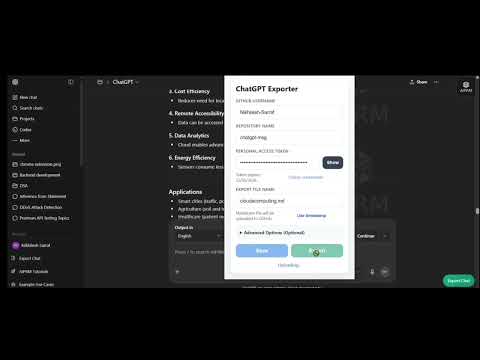
ChatGPT Exporter: Save Your Conversations Directly to GitHub in Markdown!. Tired of manually copying and pasting your ChatGPT conversations? ChatGPT Exporter is the ultimate tool for developers, students, and researchers who want to seamlessly save their ChatGPT chats directly into their GitHub repositories with a single click. With ChatGPT Exporter, your conversations are automatically converted into beautifully formatted Markdown (`.md`) files and instantly committed to the GitHub repository of your choice. Key Features: 1. One-Click Export:Instantly push your active ChatGPT conversation directly to GitHub. 2.Flawless Markdown Conversion:Automatically converts code blocks, tables, bold text, and lists into perfect, highly readable Markdown formatting. 3. Advanced Organization: Choose the exact subfolder in your repository to keep your exports perfectly organized. 4. Turn Selection:Only want a specific part of the conversation? You can select the exact start and end messages to export. 5. Custom Commits: Write your own custom commit messages right from the extension popup. 6.Smart Naming:Automatically names your file or lets you generate an instant timestamped file name. 🔒 100% Secure & Privacy-First: Your privacy and security are the top priority. 1.No Middleman Servers:** This extension talks *directly* from your browser to GitHub's official API. 2.Locally Stored Credentials:** Your GitHub Personal Access Token (PAT) is saved strictly to your browser's local sandbox storage. We never see your token, your chats, or your code. 3.Completely Free:** No paywalls, no subscriptions, and no hidden data collection. ⚙️ How to Setup: 1. Generate a GitHub Personal Access Token (Classic or Fine-Grained) with repository write permissions. 2. Open the extension popup and enter your GitHub Username, Repository Name, and Token. 3. Open any ChatGPT conversation. 4. Click "Export" and watch your chat magically appear in your GitHub repo! Stop losing your best AI prompts and coding solutions. Install ChatGPT Exporter and start backing up your knowledge base today!
0 out of 5No ratings
Details
- Version1.0.0
- UpdatedApril 25, 2026
- Offered bynikhileshsarrafking123
- Size206KiB
- LanguagesEnglish
- DeveloperNikhilesh Sarrraf
Kiit univeristy odisha,KP-26 Starcity,patia bhubaneswar,patia, Odisha 751024 INEmail
nikhileshsarrafking123@gmail.com - Non-traderThis developer has not identified itself as a trader. For consumers in the European Union, please note that consumer rights do not apply to contracts between you and this developer.
Privacy

ChatGPT Exporter has disclosed the following information regarding the collection and usage of your data. More detailed information can be found in the developer's privacy policy.
ChatGPT Exporter handles the following:
This developer declares that your data is
- Not being sold to third parties, outside of the approved use cases
- Not being used or transferred for purposes that are unrelated to the item's core functionality
- Not being used or transferred to determine creditworthiness or for lending purposes