

ChatGPT Cookies
3 个评分
)
概述
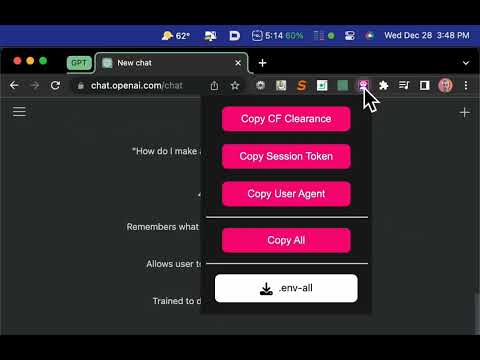
Easily copy or download your ChatGPT Cookies + user-agent values with one click.
This Chrome Extension allows you to quickly and easily copy ChatGPT cookie values and user-agent strings to your clipboard, or export a single `.env` file with everything. Usage: 1. Install the extension 2. Click on the extension icon in the Chrome toolbar to automatically navigate to the ChatGPT website 👉️ https://chat.openai.com/chat 3. Select one of the options to automatically copy the `SESSION_TOKEN`, `USER_AGENT`, and `CF_CLEARANCE` or all values at once to your clipboard, or download a single `.env-all` with all of them. 4. Paste the values wherever they are needed in your project, such as in the `.env` file. Source code: https://github.com/itsbrex/ChatGPT-Cookies ### Changelog #### v2.0 - Copy individual cookies or copy all at once - Export all values as an .env file - Added onboarding.html page #### v1.1 - Added the ability to copy `SESSION_TOKEN`, `USER_AGENT`, and `CF_CLEARANCE` values in addition to the `SESSION_TOKEN` value - Added a prompt to confirm that the session token has been successfully copied - Fixed a bug where the extension was not correctly copying the `CF_CLEARANCE` value #### v1.0 - Initial release
1 星(5 星制)3 个评分
详情
- 版本2.0
- 上次更新日期2023年1月2日
- 提供方Brian Roach
- 大小67.79MiB
- 语言English
- 开发者
邮箱
roach7@gmail.com - 非交易者该开发者尚未将自己标识为交易者。欧盟地区消费者须知:消费者权利可能不适用于您与该开发者达成的合约。
隐私权

该开发者已声明,您的数据:
- 不会因未获批准的用途出售给第三方
- 不会为实现与产品核心功能无关的目的而使用或转移
- 不会为确定信用度或放贷目的而使用或转移
支持
若有任何疑问、建议或问题,请访问开发者的支持网站