

AI Chat Organizer & PDF/Word Exporter – ChatGPT, Gemini & Claude

Overview
Organize ChatGPT, Gemini & Claude chats with folders, bookmarks, title search, batch export, PDF/Word DOCX/Image, and export styles.
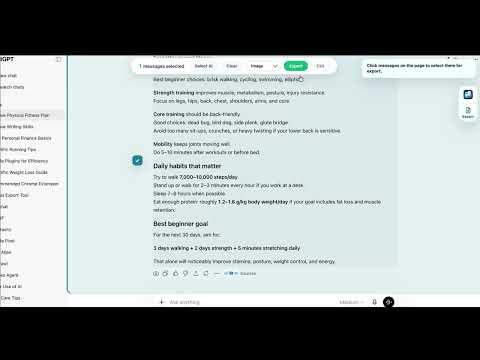
ChatVault AI is a local AI chat exporter and organizer for ChatGPT, Claude, and Gemini. Turn selected conversations into local PDF, editable Word DOCX, or Image files, then keep the original chat links organized with folders, nested folders, bookmarks, title history, title search, platform labels, backup, import, sync, and direct reopen links. Common workflows: - Export selected ChatGPT, Claude, or Gemini conversations to PDF for research notes, client handoff, reports, or personal archives - Save full threads or AI replies as editable Word DOCX files - Capture readable Image snapshots for quick sharing - Organize AI chat history by project, client, topic, course, writing draft, or code review - Bookmark reusable prompts and high-value conversation threads - Search a title-only chat history index instead of scrolling long sidebars - Reopen the original ChatGPT, Claude, or Gemini conversation from a saved record Main features: - Multi-platform organizer workspace for ChatGPT, Claude, and Gemini - Folders, nested folders, folder colors, and direct links back to original chats - Bookmarks for important conversations and reusable prompt threads - Title-only history and fast title search across saved records - Platform labels for ChatGPT, Claude, and Gemini records - Multi-select and batch organize actions for folder chats, bookmarks, and history records - Batch export for saved records when available in your plan - Export the current page, selected messages, full conversations, or AI replies only - Local PDF export - Editable Word DOCX export - Image export for shareable conversation snapshots - Export themes and style settings, with premium styles available in Pro - Backup, import, and automatic local backup options for organizer data - Account-backed sync for organizer metadata and settings Free preview: - Unlimited folders and bookmarks for organizer metadata - Save up to 3 new chat records per day - Export up to 3 chats per day to local PDF, Word DOCX, or Image files - Default export style included - No payment card required for the free preview ChatVault Pro: - Pro Monthly: $4.99 per month - Pro Yearly: $29.99 per year - Lifetime Early Bird: $49.99 one-time - Pro unlocks unlimited daily saves, unlimited daily exports, and premium export styles for PDF, Word DOCX, and Image workflows Built for: - Developers organizing debugging, code review, and architecture chats - Product teams saving research, planning notes, and launch conversations - Writers and marketers collecting useful AI drafts and reusable prompts - Students and researchers keeping learning chats easy to reopen - Power users who want a cleaner AI chat history workflow Privacy notes: ChatVault AI sync is built for organizer metadata: chat titles, conversation IDs, URLs, platform labels, timestamps, folders, bookmarks, settings, linked account metadata, backup metadata, and billing entitlement status. PDF, Word DOCX, and Image exports are generated locally from conversations the user chooses. Exported message content is not stored in ChatVault AI sync. ChatVault AI does not store prompts, AI responses, full chat message bodies, uploaded files, attachments, browser cookies, platform passwords, platform authentication tokens, or payment card data. ChatVault AI does not sell user data, use user data for advertising, or use saved organizer metadata to train AI models. Supported platforms: - ChatGPT - Claude - Gemini
5 out of 54 ratings
Details
- Version3.2.7
- UpdatedAugust 4, 2026
- FeaturesOffers in-app purchases
- Size474KiB
- Languages9 languages
- DeveloperWebsite
Email
chatvaultaisupport@gmail.com - Non-traderThis developer has not identified itself as a trader. For consumers in the European Union, please note that consumer rights do not apply to contracts between you and this developer.
Privacy

AI Chat Organizer & PDF/Word Exporter – ChatGPT, Gemini & Claude has disclosed the following information regarding the collection and usage of your data. More detailed information can be found in the developer's privacy policy.
AI Chat Organizer & PDF/Word Exporter – ChatGPT, Gemini & Claude handles the following:
This developer declares that your data is
- Not being sold to third parties, outside of the approved use cases
- Not being used or transferred for purposes that are unrelated to the item's core functionality
- Not being used or transferred to determine creditworthiness or for lending purposes
Support
For help with questions, suggestions, or problems, please open this page on your desktop browser