

ChatGPT Chat Pinner

Overview
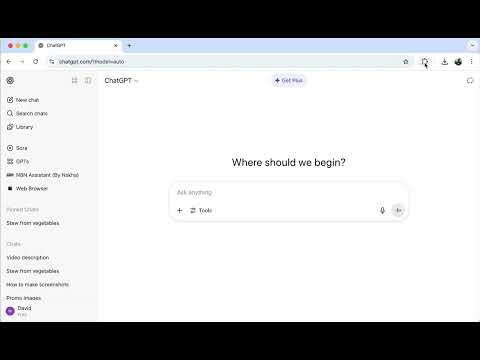
Pin your favorite ChatGPT chats for quick access
Tired of endlessly scrolling to find important chats? ChatGPT Chat Pinner is a lightweight Chrome extension that lets you pin an unlimited number of conversations in ChatGPT — keeping your most important chats always at the top and instantly accessible. 🚀 Key Features: Unlimited Pinning: Pin as many chats as you need — no limits, no clutter, just easy access to what matters. Pin & Unpin with One Click: Organize your chat history by pinning favorite or frequently used conversations. Auto Sync with Google: Pinned chats sync across all Chrome browsers via Google Sync (if enabled). No Tracking. No Analytics. 100% Private: We do not track you, collect data, or use any third-party APIs. Everything stays locally in your browser. Clean & Native Feel: Seamlessly integrates with ChatGPT’s sidebar. Supports light and dark modes. ✅ How to Use: Install the ChatGPT Chat Pinner extension. Go to chat.openai.com. Right-click any conversation and choose "Pin Chat". Your pinned chats will appear at the top of your chat list — always ready when you are. Take control of your ChatGPT sidebar. Stay organized, save time, and never lose track of important conversations again. Install ChatGPT Chat Pinner now — it's private, fast, and free.
0 out of 5No ratings
Details
- Version0.1.0
- UpdatedAugust 13, 2025
- Offered byBrowser Tools
- Size48.29KiB
- Languages12 languages
- DeveloperSTANISLAV MITKIN
Email
stanmitkin@gmail.comPhone
+62 812-3074-4260 - TraderThis developer has identified itself as a trader per the definition from the European Union and committed to only offer products or services that comply with EU laws.
Privacy

This developer declares that your data is
- Not being sold to third parties, outside of the approved use cases
- Not being used or transferred for purposes that are unrelated to the item's core functionality
- Not being used or transferred to determine creditworthiness or for lending purposes
Support
For help with questions, suggestions, or problems, please open this page on your desktop browser