

ChatGPT Chat Map

Overview
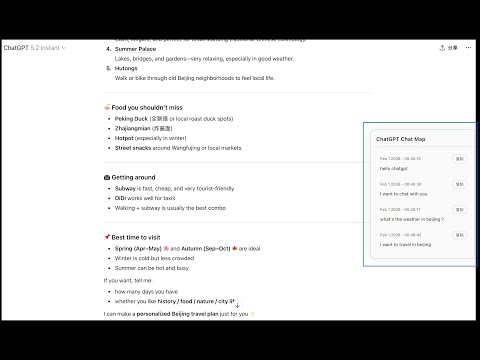
Show a chat message map on the right side of ChatGPT pages and jump to message positions on click.
## One-Sentence Overview Display a sidebar on the right side of the ChatGPT conversation page that lists **every message you’ve sent** in the current chat. Click any item to jump to its position in the page, with support for per-message timestamps and one-click copy. --- ## Feature Overview ### User Message Map - **Sidebar list**: A fixed sidebar appears on the right side of the ChatGPT conversation page, listing all user messages you’ve sent in the current conversation in order. - **Content preview**: Each list item shows a short preview of the message (long content is automatically truncated with an ellipsis) to help you quickly recognize it. - **Click to jump**: Clicking any item smoothly scrolls the page to the corresponding message in the conversation and highlights it, making long chats easy to navigate. ### Timestamps - **Sent time**: Each user message displays its send time (Month Day Year – HH:MM:SS). - **Time source**: Preferentially uses the creation time returned by the conversation interface to stay consistent with ChatGPT; if unavailable, falls back to parsing the page structure to keep timestamps usable. - **12/24-hour format**: Supports both 12-hour (AM/PM) and 24-hour formats. If you’ve installed and configured a “ChatGPT Timestamp”-style extension with a 24-hour preference, this extension will read and follow the same setting. ### Copy & Actions - **One-click copy**: Each list item includes a “Copy” button. Clicking it copies the full text of that user message to the clipboard and briefly shows a “Copied” confirmation. ### Experience & UI - **Auto refresh**: The sidebar automatically updates when the conversation changes (for example, when you send a new message, receive a reply, or the page DOM updates), with no manual refresh required. - **Hidden when empty**: If the current conversation contains no user messages, the sidebar stays hidden to avoid empty placeholders. - **Light/Dark theme**: The sidebar adapts to the system’s preferred color scheme, supporting both light and dark modes and matching the ChatGPT page style. - **Accessibility**: The sidebar and copy buttons include appropriate accessibility labels for assistive technologies. ### Technical Characteristics - **Content-script only**: The extension injects only a content script—no background scripts, no popups—and runs only when visiting ChatGPT. - **Minimal permissions**: Requests access only to `chat.openai.com` and `chatgpt.com`. It does not collect or upload any personal data. --- ## Supported Pages - `https://chat.openai.com/*` - `https://chatgpt.com/*` On any of the above conversation pages, after opening or refreshing, if the current chat contains user messages, the **“ChatGPT Chat Map”** sidebar will appear automatically on the right. --- ## Usage Instructions 1. After installing the extension, open or refresh a ChatGPT conversation page. 2. If the current conversation already contains messages you’ve sent, the **“ChatGPT Chat Map”** sidebar will appear on the right. 3. Click any message in the sidebar to scroll to and highlight it in the conversation; click “Copy” next to it to copy the full message text. 4. When you send new messages or the conversation updates, the list refreshes automatically.
0 out of 5No ratings
Details
- Version1.0.2
- UpdatedMarch 30, 2026
- Offered byfanxiushan
- Size17.68KiB
- LanguagesEnglish (United States)
- Developer
Email
fanxiushan@gmail.com - Non-traderThis developer has not identified itself as a trader. For consumers in the European Union, please note that consumer rights do not apply to contracts between you and this developer.
Privacy

ChatGPT Chat Map has disclosed the following information regarding the collection and usage of your data. More detailed information can be found in the developer's privacy policy.
ChatGPT Chat Map handles the following:
This developer declares that your data is
- Not being sold to third parties, outside of the approved use cases
- Not being used or transferred for purposes that are unrelated to the item's core functionality
- Not being used or transferred to determine creditworthiness or for lending purposes
Support
For help with questions, suggestions, or problems, visit the developer's support site