

ChatGPT Bookmarks Sidebar

Overview
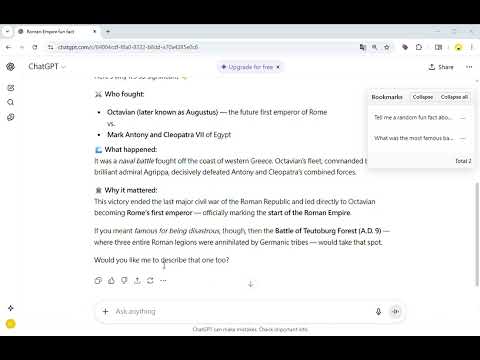
Create a floating bookmark panel on the right side of the ChatGPT page to quickly jump to your questions.
ChatGPT Bookmarks Sidebar Add a collapsible bookmarks sidebar on the right when using ChatGPT to centrally manage the questions you ask in a conversation. Supports expanding full text, expand/collapse all, counting total bookmarks, and clicking to jump back to the original question, making it more efficient to browse long conversations. ✨ Key Features • Floating bookmarks panel: Fixed on the right side, can be opened or collapsed anytime. • Auto-truncate & expand full text: Quickly skim long questions and expand only when needed. • One-click expand/collapse all: Saves time when managing many questions. • Display total count: Keep track of how many questions have been bookmarked on this page. • Click to scroll back to position: Jump back to the corresponding question block to continue context. 🛠️ How to Use • Open chat.openai.com and go to your conversation page. • The bookmarks sidebar will appear on the right, listing the questions on this page. • Click any bookmark to automatically scroll to that paragraph. • Expand full text, expand/collapse all, or collapse the entire sidebar as needed. 🔒 Permissions & Privacy • Works only on the ChatGPT website. • Bookmarks are used only for local display and operations. • Does not collect or upload your conversation content. 💌 Support • For questions or suggestions, please provide feedback via the extension page. • Like this tool? Click “Support the developer / Donate” in the tool button to support development. • Keywords: ChatGPT, bookmarks, sidebar, floating panel, question management.
0 out of 5No ratings
Details
- Version1.1
- UpdatedNovember 7, 2025
- Offered byDS Wang
- Size36.04KiB
- Languages12 languages
- Developer
Email
cla635@gmail.com - Non-traderThis developer has not identified itself as a trader. For consumers in the European Union, please note that consumer rights do not apply to contracts between you and this developer.
Privacy

This developer declares that your data is
- Not being sold to third parties, outside of the approved use cases
- Not being used or transferred for purposes that are unrelated to the item's core functionality
- Not being used or transferred to determine creditworthiness or for lending purposes