

ChatGPT Backup - ChatGPT to PDF, MD, and more

Overview
Backup your OpenAI ChatGPT history in either JSON or Markdown format
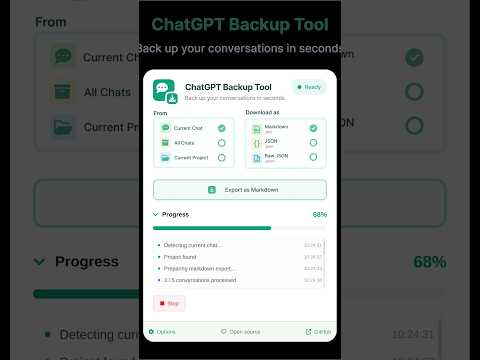
Export and save your ChatGPT conversations as PDF, Markdown, or JSON files. ChatGPT Backup provides simple tools for keeping local copies of conversations, exporting project chats, and creating structured backups that you can use outside ChatGPT. FEATURES PDF Export • Save the conversation you are currently viewing as a PDF. • Preview messages before printing. • Include or exclude individual messages. • Preserve selectable text, links, tables, code blocks, and supported images. • PDF generation uses Chrome’s built-in print functionality. Markdown Export • Download the current conversation as Markdown. • Export multiple conversations as separate Markdown files in a ZIP archive. • Customize User and Assistant labels. • Enable MDX-compatible formatting and optional frontmatter. Conversation Backup • Export conversation history as JSON. • Download conversations as a ZIP archive of Markdown files. • View export progress while a backup is running. • Stop an export when needed. No Extension-Imposed Export Limit ChatGPT Backup does not impose a limit on how many supported conversations you can export. You can create additional exports whenever you need them, subject to the availability of the content in ChatGPT and normal browser or device limitations. Project Export Export conversations from the ChatGPT project you are currently viewing and keep related conversations together in your own archive. JSON and Raw JSON Save structured conversation data for personal scripts, analysis, migration, or other workflows. PRIVACY • Exported files are saved to your device. • Conversation content is not sent to the extension developer for PDF processing. • No third-party analytics tracking is used. • Export operations begin only when you initiate them. • PDF output is generated through Chrome’s local print functionality. OPEN SOURCE ChatGPT Backup is open source. You can review the source code, report issues, and suggest improvements through the project’s GitHub repository. HOW TO USE 1. Open ChatGPT and navigate to a conversation or project. 2. Open ChatGPT Backup from the Chrome toolbar. 3. Choose what you want to export. 4. Select an available format. 5. Start the export. To save a conversation as PDF, choose Current Chat → PDF → Preview conversation. Select the messages you want to include, continue to Chrome’s print dialog, and choose “Save as PDF.” FREQUENTLY ASKED QUESTIONS Is there a limit on how many conversations I can export? ChatGPT Backup does not impose a limit on the number of supported exports you can create. Practical limits may still depend on your browser, device resources, available storage, and the rate limits by OpenAI. Can I save only certain messages? Yes. Before creating a PDF, you can choose which messages to include or exclude. This does not change the original conversation. Can I export multiple conversations? Yes. Conversation history can be exported as JSON or as individual Markdown files inside a ZIP archive. Can I export every conversation as PDF at once? PDF export is currently available for the conversation you are viewing. Bulk exports are available in supported Markdown and JSON formats. Does PDF export preserve formatting? PDF output supports selectable text, links, tables, monospaced code, and supported embedded images. Mathematical equations are preserved as source text rather than rendered formulas. Some attachments or images may not be included. Can I customize Markdown files? Yes. You can configure conversation labels, Markdown or MDX formatting, and optional frontmatter. Does the extension upload my conversations to a PDF server? No. PDF generation uses Chrome’s built-in print functionality and does not require an external PDF processing server. SUPPORT Report issues or suggest improvements: https://github.com/FredySandoval/ChatGPT-CHROME_EXTENSION/issues ChatGPT Backup is an independent extension and is not affiliated with or endorsed by OpenAI.
5 out of 52 ratings
Details
- Version0.1.6
- UpdatedOctober 26, 2026
- Size355KiB
- LanguagesEnglish (United States)
- DeveloperWebsite
Email
lnxmntrs@gmail.com - Non-traderThis developer has not identified itself as a trader. For consumers in the European Union, please note that consumer rights do not apply to contracts between you and this developer.
Privacy

This developer declares that your data is
- Not being sold to third parties, outside of the approved use cases
- Not being used or transferred for purposes that are unrelated to the item's core functionality
- Not being used or transferred to determine creditworthiness or for lending purposes
Support
For help with questions, suggestions, or problems, please open this page on your desktop browser