

ChatGPT Export & Outline: HTML, Markdown, JSON & Highlights | OutlineSave

Overview
Outline long chats and export searchable HTML, Markdown or JSON with notes and highlights. Works with Gemini, Claude & DeepSeek.
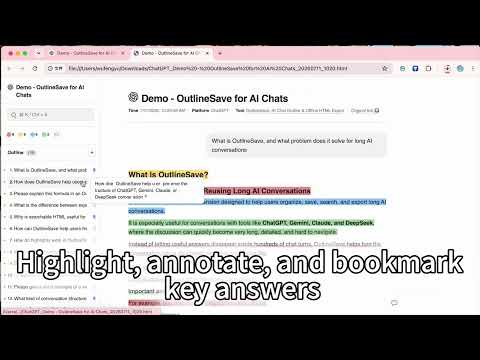
🔍 Lost something important in a long ChatGPT conversation? 📑 Complete 2-level outline: See the full conversation structure and jump straight to any section 🖍️ Highlight & annotate: Mark important content directly on the page 💾 Searchable offline HTML: Save the entire conversation with its outline, annotations, math, diagrams, and code 🔒 Local-first: Your AI conversations stay in your browser by default — not on our servers 📑 Long conversations, instant navigation No more endless scrolling through old messages. 👤 Your prompts → Level 1 🤖 Response headings → Level 2 🎯 Click an item → Jump straight to the original content The longer the conversation, the more time you save. ✏️ Annotate directly on the page Found something worth keeping? Mark it right where it is: 🟨🟩🟦🟥 4-color highlights 〰️ Underline 📝 Notes 🔖 Bookmarks 🔍 Search & filters Great for research, coding sessions, study notes, and anything you’ll want to find again later. 💾 Save as searchable offline HTML More than just exporting a chat. 📑 Full outline & navigation 🔍 Full-text search & filters 🖍️ Highlights, underlines, notes & bookmarks ∑ Math equations 🔀 Diagrams & flowcharts 💻 Code with syntax highlighting Once saved, there’s no need to reload the original long conversation. Open the local HTML file anytime to search, navigate, and review. 🌐 See an HTML export demo: https://wisteriasoftware.uk/demo 📦 More export options 📝 Markdown: Keep editing, back up your conversations, or add them to your own knowledge base 🧩 JSON: Save structured conversation data 🤖 Built for long ChatGPT conversations Also supports Gemini, Claude, and DeepSeek. Feature availability may vary across platforms. 🔒 Local-first by design Your AI conversation content is processed locally in your browser by default and is not uploaded to Wisteria Software servers. Your outlines, highlights, notes, and bookmarks stay local too. ☁️ Google Drive backup is optional. Only when you choose to connect and authorize Google Drive are exported files saved directly to your own Drive. 🎁 Free 📑 Outline navigation 🖍️ Highlights, notes & bookmarks 📝 Markdown & JSON export 💾 1 offline HTML export per week 🎁 7-day Pro trial for new users ⭐ Pro 💾 Unlimited searchable offline HTML exports 💳 One-time payment — no auto-renewal 🗓️ Choose a 1-year or lifetime license
4.9 out of 533 ratings
Details
- Version3.7.4
- UpdatedSeptember 23, 2026
- Size2.2MiB
- Languages12 languages
- DeveloperWisteria Software LtdWebsite
64 Nile Street London N1 7SR GBEmail
info@wisteriasoftware.ukPhone
+852 4443 0824 - TraderThis developer has identified itself as a trader per the definition from the European Union and committed to only offer products or services that comply with EU laws.
- D-U-N-S234488462
Privacy

ChatGPT Export & Outline: HTML, Markdown, JSON & Highlights | OutlineSave has disclosed the following information regarding the collection and usage of your data. More detailed information can be found in the developer's privacy policy.
ChatGPT Export & Outline: HTML, Markdown, JSON & Highlights | OutlineSave handles the following:
This developer declares that your data is
- Not being sold to third parties, outside of the approved use cases
- Not being used or transferred for purposes that are unrelated to the item's core functionality
- Not being used or transferred to determine creditworthiness or for lending purposes
Support
For help with questions, suggestions, or problems, visit the developer's support site