

AI Chat Backup: ChatGPT to Notion, Obsidian & Markdown

Overview
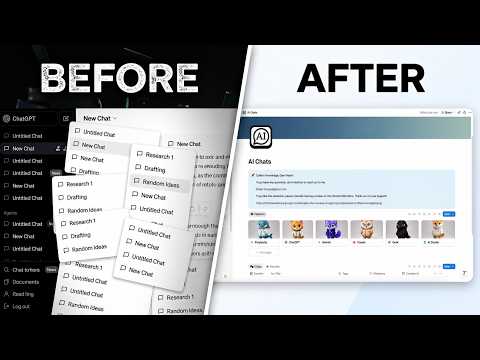
Export AI conversations to Markdown, save them to Obsidian folders, or sync to Notion. Backup chats from popular AI platforms.
AI Chat Backup: Your Personal AI Conversation Archive Keep valuable AI conversations from getting lost in endless chat history. AI Chat Backup helps you export conversations from popular AI platforms, save them as Markdown files, organize them in an Obsidian-compatible folder, or sync them to your Notion workspace. KEY FEATURES • Multi-Platform Support Export conversations from ChatGPT, Claude, Gemini, and more. • Markdown Export Save the current conversation as a Markdown file for offline access, sharing, or long-term archiving. • Generated Image Download Download all AI-generated images from a ChatGPT conversation with one click. • Obsidian-Compatible Export Save Markdown files directly to a local folder, including your Obsidian vault. • Optional Notion Sync Send selected conversations to your authorized Notion workspace and build a searchable personal knowledge base. • No Sign-In Required for Local Export Export conversations and download generated images without connecting a Notion account. • Simple Workflow Export, download, or sync your conversations in just a few clicks. WHY USE AI CHAT BACKUP? • Keep valuable answers, research notes, prompts, code examples, and generated images organized. • Build a personal archive across multiple AI platforms. • Revisit past conversations without searching through long chat histories. • Save useful AI-assisted work in tools you already use, including Markdown, Obsidian, and Notion. • Stay in control. Conversations are exported or synced only when you choose.
4.3 out of 526 ratings
Details
- Version2.3.1
- UpdatedSeptember 28, 2026
- Size2.33MiB
- Languages5 languages
- DeveloperWebsite
Email
lnmput@gmail.com - Non-traderThis developer has not identified itself as a trader. For consumers in the European Union, please note that consumer rights do not apply to contracts between you and this developer.
Privacy

This developer declares that your data is
- Not being sold to third parties, outside of the approved use cases
- Not being used or transferred for purposes that are unrelated to the item's core functionality
- Not being used or transferred to determine creditworthiness or for lending purposes
Support
For help with questions, suggestions, or problems, please open this page on your desktop browser