Übersicht
WhatsApp Chat Exporter - Exportieren Sie Nachrichten als CSV, Excel, JSON und laden Sie Videos, Bilder, Audio, Dokumente
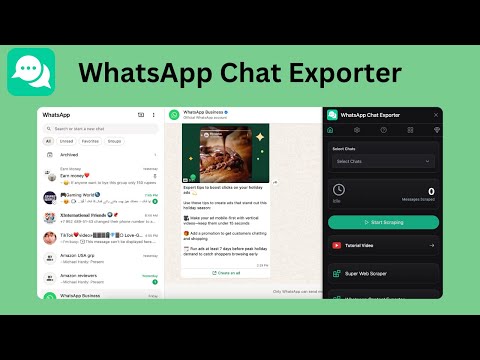
🚀 WhatsApp Chat Exporter – Effortless Backup & Download of Your WhatsApp Chats! WhatsApp Chat Exporter is your ultimate Chrome extension for saving, backing up, and exporting your WhatsApp Web chats with ease. No more worrying about losing important conversations or struggling to keep business records organized. Export your WhatsApp messages in formats like CSV, JSON, and Excel (XLSX) — perfect for personal use, business reporting, legal documentation, or simply preserving memories with friends and family. Whether you’re an entrepreneur, digital marketer, lawyer, journalist, or everyday user, this tool makes WhatsApp chat management incredibly simple and safe. 🌟 Why Choose WhatsApp Chat Exporter? ✅ Quick & Hassle-Free Exports • Download your WhatsApp chats in just a few clicks • No tech skills required — easy for everyone! ✅ Multiple Export Formats • CSV: Great for spreadsheets, data analysis, or integration into other tools • JSON: Ideal for developers needing structured data • Excel (XLSX): Perfect for business records or professional documentation ✅ Save Time with Batch Exports • Export entire conversations or pick specific time frames • Perfect for large chat histories or focused data extraction ✅ Selective Media Downloads • Choose which media types to download: videos, images, audios, or documents • Filter messages by date range for targeted exports • Save storage space by downloading only what you need ✅ One-Click Simplicity • A clear Export button right inside WhatsApp Web • No switching tabs or complicated steps ✅ Organized Storage • Files are automatically saved in a folder linked to the account you’re exporting, ensuring everything stays tidy 🛠️ How to Use WhatsApp Chat Exporter Using WhatsApp Chat Exporter is super simple: 1. Go to web.whatsapp.com and log in to your account 2. Click the extension icon to open the WhatsApp Chat Exporter interface 3. Select the chats you want to export from the dropdown menu 4. Click the Filters button to customize your export: • Set a date range (Start Date and End Date) to filter messages • Choose which media types to download: Videos, Images, Audios, or Documents 5. Click Start to begin fetching messages 6. Once fetching is complete: • Click Export to save your chat messages in CSV, JSON, or Excel format • Click Download Media to save selected media files to your computer That's it — your WhatsApp chat and media are safely stored on your device! 💼 Who Needs WhatsApp Chat Exporter? • Businesses & Professionals 🧑💼 • Archive customer conversations for record-keeping • Store chat logs for legal or compliance requirements • Keep project discussions and agreements documented • Journalists & Researchers 📰 • Save interviews and investigation notes • Maintain secure, searchable archives of conversations • Everyday Users 👫 • Back up personal chats for sentimental value • Export conversations with photos, videos, and voice notes for easy sharing or printing • Developers & Analysts 👨💻 • Export data for analysis, processing, or integration with other applications 🔒 Data Privacy & Security 🔐 Your privacy is our top priority. • All data stays strictly on your local device • No chat content is ever sent to our servers • You remain fully in control of your personal and business conversations Enjoy peace of mind knowing your sensitive information remains private and secure. ⚠️ Disclaimer This extension is independently developed by Microplugin and has no affiliation with WhatsApp LLC.
Details
- Version2.0.0
- Aktualisiert25. August 2026
- Größe391KiB
- Sprachen10 Sprachen
- EntwicklerWebsite
E-Mail
microplugin@gmail.com - Kein HändlerDieser Entwickler hat sich nicht als Händler deklariert. Für Verbraucher in der Europäischen Union gelten die Verbraucherrechte nicht für Verträge, die zwischen dir und diesem Entwickler geschlossen werden.
Datenschutz

Chat-Exporter für WA hat folgende Informationen hinsichtlich der Erhebung und Nutzung deiner Daten offengelegt. Weitere Details findest du im privacy policy des Entwicklers.
Chat-Exporter für WA verarbeitet Folgendes:
Dieser Entwickler erklärt, dass deine Daten
- nicht an Dritte verkauft werden, außer in den genehmigten Anwendungsfällen
- nicht für Zwecke genutzt oder übertragen werden, die nichts mit der Hauptfunktionalität des Artikels zu tun haben
- nicht zur Ermittlung der Kreditwürdigkeit oder für Darlehenszwecke verwendet oder übertragen werden
Support
Wenn du Probleme, Fragen oder Vorschläge hast, rufe die Supportwebsite des Entwicklers auf