

Chartink to TradingView/Screener
3 ratings
)

Overview
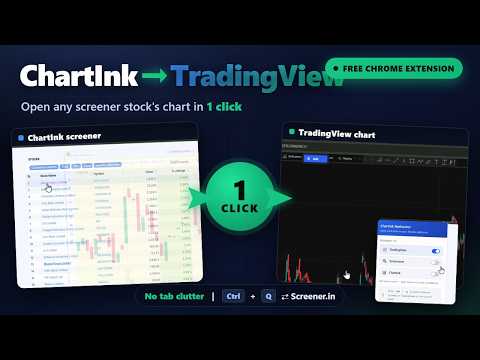
Redirect Chartink stock links to TradingView or Screener. Switch between them instantly with Ctrl+Q.
Speed up your stock research workflow. Chartink to TradingView / Screener turns every Chartink stock link into a one-click jump to the platform you actually analyze on — and lets you hop between TradingView and Screener.in for the same stock without ever typing a ticker. ⚡ WHAT IT DOES • Click any stock on Chartink and it opens straight in your chosen platform — TradingView, Screener.in, or both. • Land on a Chartink stock page directly? It forwards you to your preferred platform automatically. • No more copy-pasting tickers or hunting through tabs. 🔁 INSTANT PLATFORM SWITCHING — Ctrl + Q Looking at a stock on Screener and want the chart? Press Ctrl + Q to open it on TradingView. On a TradingView chart and want the fundamentals? Press Ctrl + Q to jump to Screener.in for the same stock. One shortcut, both directions. ✅ PICK YOUR DESTINATIONS Open the popup and toggle any combination of: • TradingView • Screener.in • Chartink Each opens in its own reusable tab, so your browser never piles up with duplicates. ✨ THOUGHTFUL TOUCHES • Clicked stocks are highlighted on Chartink so you never lose your place. • Reusable tabs keep things tidy. • Clean, modern popup — set it once and forget it. 🔒 PRIVACY FIRST This extension does not collect, store, or transmit any personal data. Your platform preferences are saved locally in your browser only. No tracking, no analytics, no accounts. ⌨️ KEYBOARD SHORTCUT Ctrl + Q → Switch between TradingView and Screener for the current stock. 🛠️ HOW TO USE 1. Click the extension icon and tick the platform(s) you want. 2. Click any stock link on Chartink — it opens in your selected platform(s). 3. While viewing a stock on TradingView or Screener, press Ctrl + Q to switch. Built for Indian market traders and investors who live between Chartink, TradingView, and Screener.in. Have feedback or found a bug? Use the "Report a bug or suggest improvements" link inside the extension popup. Developed by Alen Sarang Satheesh.
5 out of 53 ratings
Details
- Version1.13
- UpdatedAugust 22, 2026
- Offered byAlen Sarang Satheesh
- Size21.28KiB
- LanguagesEnglish (United Kingdom)
- Developer
Email
alensarangsatheesh@gmail.com - Non-traderThis developer has not identified itself as a trader. For consumers in the European Union, please note that consumer rights do not apply to contracts between you and this developer.
Privacy

This developer declares that your data is
- Not being sold to third parties, outside of the approved use cases
- Not being used or transferred for purposes that are unrelated to the item's core functionality
- Not being used or transferred to determine creditworthiness or for lending purposes
Support
For help with questions, suggestions, or problems, visit the developer's support site