


Overview
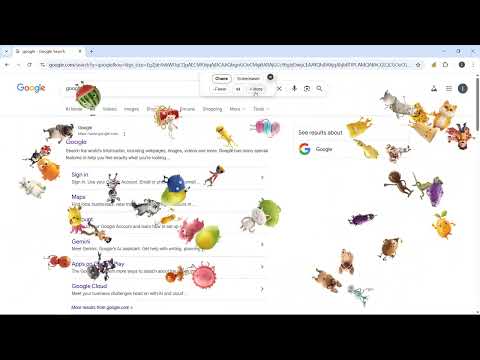
Spawn chaotic animated characters on any page — watch them bounce wildly or switch to Screensaver!
Add lively animated characters to any page — switch between Chaos and Screensaver modes for fun and entertainment! 🎮 How to Play 1. Click the extension icon in your browser toolbar to start. 2. Animated GIF characters instantly appear and start bouncing around your page. A dashboard appears at the top center with mode buttons. 3. Switch between two modes: ⚡ Chaos Mode – Characters move fast, wild, and unpredictably with random direction changes. ✨ Screensaver Mode – Characters float peacefully and gently around your page. 4. Use the + More / – Fewer buttons to add or remove characters (up to 48 at once). 5. To exit, click the close (×) icon in the dashboard or simply click the extension icon again. Tip: If the game freezes, simply reload the page and try again. ⭐ Features * Works instantly on any website — your page stays usable underneath. * Two modes: Chaos for energetic fun, Screensaver for a calming vibe. * Adjustable character count from 4 to 48. * Characters retain their images when switching modes — no reloading. * Lightweight, smooth animations that don't slow down your browsing. ⚡Whether you want a burst of chaotic energy or a calming screensaver, Character Chaos makes every page more entertaining!
0 out of 5No ratings
Details
- Version0.1.0
- UpdatedMay 23, 2026
- Size31.52KiB
- LanguagesEnglish
- DeveloperWebsite
Email
gameany.contact@gmail.com - Non-traderThis developer has not identified itself as a trader. For consumers in the European Union, please note that consumer rights do not apply to contracts between you and this developer.
Privacy

This developer declares that your data is
- Not being sold to third parties, outside of the approved use cases
- Not being used or transferred for purposes that are unrelated to the item's core functionality
- Not being used or transferred to determine creditworthiness or for lending purposes
Support
For help with questions, suggestions, or problems, visit the developer's support site