

ChaosMonkey Tester
1 rating
)
Overview
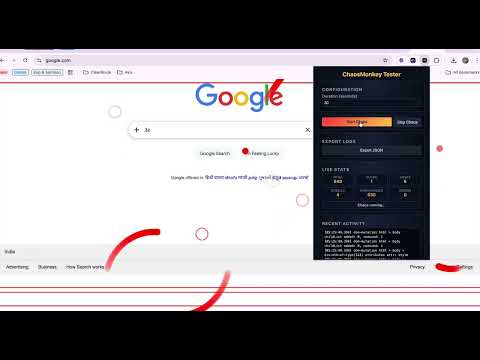
Run configurable Gremlins.js monkey testing with detailed activity logging on any page.
ChaosMonkey Tester ChaosMonkey Tester turns your browser into a powerful chaos testing tool for the web. It runs automated Gremlins.js monkey testing on any website you visit, simulating unpredictable user behavior to uncover UI bugs, crashes, and edge cases before your users do. Simulate real user chaos Executes hundreds of random user-like actions including clicks, scrolls, typing, form inputs, and touch events Stress-tests web applications under unpredictable interaction patterns Flexible test configuration Set a custom test duration in seconds Start and stop chaos testing anytime Live testing insights Real-time statistics showing: Total actions executed Clicks Inputs Scrolls DOM changes JavaScript errors Detailed activity logging Every action is recorded with: Timestamp Element selector Coordinates Event details DOM change tracking Automatically captures DOM snapshots before and after each run Helps identify UI changes and unexpected state mutations Exportable test reports Generate a comprehensive JSON report including: Metadata Test statistics Action logs DOM snapshots The report automatically downloads when the test run completes 👨💻 Who Should Use ChaosMonkey Tester? This extension is designed for: Frontend Engineers stress-testing UI behavior QA Engineers validating application robustness Developers identifying hidden bugs and edge cases Teams practicing chaos engineering for web interfaces 🧪 How to Use Open the website you want to test Click the ChaosMonkey Tester extension icon Set the test duration Click Start Chaos Watch the live stats and activity log as actions run When the test completes, the JSON report downloads automatically You can then analyze the report to identify errors, UI instability, or unexpected DOM behavior. ⚠️ Important Note Use this extension only on websites you own or have permission to test. Automated interactions may trigger anti-bot protections or rate limiting on some sites.
5 out of 51 rating
Details
- Version1.0.0
- UpdatedMarch 16, 2026
- Offered byscorpian.ameya
- Size135KiB
- LanguagesEnglish (United Kingdom)
- DeveloperAmeya Balkrishna Natu
2/39, Ahmed Sailor Bldg, G. K. Road, Naigaon, Dadar Mumbai, Maharashtra 400014 INEmail
scorpian.ameya@gmail.comPhone
+91 96190 25473 - TraderThis developer has identified itself as a trader per the definition from the European Union and committed to only offer products or services that comply with EU laws.
Privacy

This developer declares that your data is
- Not being sold to third parties, outside of the approved use cases
- Not being used or transferred for purposes that are unrelated to the item's core functionality
- Not being used or transferred to determine creditworthiness or for lending purposes
Support
For help with questions, suggestions, or problems, please open this page on your desktop browser