

Bulk Delete LinkedIn Posts, Comments & Likes – Activity Cleaner

Overview
Bulk delete your LinkedIn posts, comments, likes and reactions. A LinkedIn activity cleaner with dry run and safe pace.
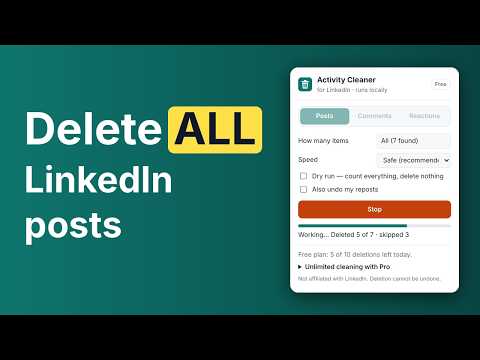
Bulk delete your old LinkedIn posts, comments, likes and reactions in a few clicks, instead of removing them one by one. Changing jobs, rebranding, or just tired of old activity? Activity Cleaner clears your LinkedIn history safely, right in your browser. WHAT IT CAN CLEAN • Delete your LinkedIn posts (and, optionally, undo your reposts) • Remove your comments on other people's posts • Unlike posts: remove your likes, celebrates and other reactions SEE THE WHOLE JOB FIRST • Dry run counts everything that would be removed and deletes nothing • "How many items" is set to All by default, or type your own number • Switch between Posts, Comments and Reactions in one click SAFE BY DESIGN • Human-like pace: one item at a time with automatic breaks • Skips content that isn't yours • Stops by itself if anything looks wrong, and you can stop at any moment PRIVATE • Runs 100% in your browser using the LinkedIn session you already have open • Never asks for your password • Collects no data, no servers involved CHOOSE EXACTLY WHAT TO DELETE (PRO) • Tick specific posts, comments or reactions right on the LinkedIn page • Keep the ones you like, delete only the selected items FREE AND PRO • Free: up to 10 deletions per day, unlimited dry runs • Pro: unlimited cleaning and choosing items to delete. 7-day pass for $9 (one-time, no subscription) or $39/year HOW TO USE 1. Open LinkedIn in Chrome (English, Spanish, French or Dutch interface). 2. Click the extension icon and choose Posts, Comments or Reactions. 3. Run a dry run, then start cleaning. FAQ • How do I delete all my LinkedIn posts at once? LinkedIn has no "delete all" button. Open Activity Cleaner, choose Posts, run a dry run to see how many there are, then start cleaning. • Can I delete all my LinkedIn comments? Yes. Choose Comments and it removes your comments on other people's posts one by one. • How do I remove all my likes on LinkedIn? Choose Reactions: it unlikes posts and removes celebrates, supports and other reactions. • Will my LinkedIn account get blocked? The cleaner works at a human-like pace with breaks and stops by itself if something looks wrong. "Safe" speed is recommended for large cleanups. • Does it work in Edge and Firefox? Yes, Activity Cleaner is also available for Microsoft Edge and Firefox. NOTES • Deleted content cannot be restored. • Automated actions may be against LinkedIn's terms; use at your own risk. • Not affiliated with, endorsed or sponsored by LinkedIn Corporation. Questions or ideas? support@billablecalc.com
5 out of 51 rating
Details
- Version0.3.0
- UpdatedNovember 22, 2026
- Size45.2KiB
- Languages4 languages
- Developer
- TraderThis developer has identified itself as a trader per the definition from the European Union and committed to only offer products or services that comply with EU laws.
Privacy

This developer declares that your data is
- Not being sold to third parties, outside of the approved use cases
- Not being used or transferred for purposes that are unrelated to the item's core functionality
- Not being used or transferred to determine creditworthiness or for lending purposes
Support
For help with questions, suggestions, or problems, visit the developer's support site