


개요
WebXR Emulator for Meta Quest devices
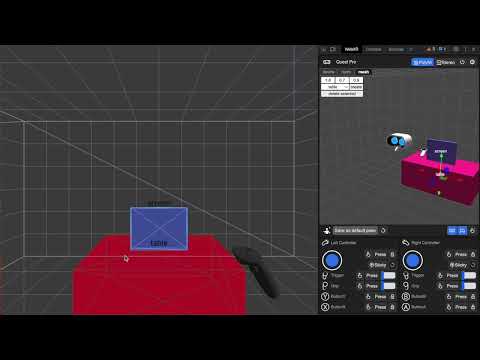
Develop WebXR experiences efficiently and effectively on Meta Quest with Immersive Web Emulator. This browser extension provides a user-friendly interface and is capable of simulating all Meta Quest headsets, enabling developers to easily test and iterate their WebXR experiences without a physical XR device. Key Features - Interactive 3D viewport to easily transform manipulation of the VR headset and the controllers - Simulate controller input, binary input (buttons), and analog input (trigger, grip, joysticks) - Simulate hand input, including built-in hand poses and pinch gesture control - Keyboard action mapping for added efficiency - Keyboard input relay The extension is built on top of the WebExtensions API, and implements the newly introduced Chrome Extension Manifest V3, which means that it will operate with enhanced security and performance on most Chromium-based desktop browsers. How to Use It - Download the extension from this page. - Navigate to a WebXR app, such as this Three.js example: https://threejs.org/examples/webxr_xr_dragging The app will detect WebXR support as if you are visiting from the specified Meta Quest device, and let you enter immersive (AR/VR) mode. - Launch the desktop browser’s developer tool panel, and navigate to the “WebXR” tab to control the emulated device. Developer Resources - Learn more about Immersive Web Emulator: https://developer.oculus.com/blog/webxr-development-immersive-web-emulator/ - Find detailed instructions on using Immersive Web Emulator: https://github.com/meta-quest/immersive-web-emulator#immersive-web-emulator-usage
5점 만점에 4.7점평점 24개
세부정보
- 버전1.5.0
- 업데이트됨2023년 12월 20일
- 제공Meta
- 크기700KiB
- 언어English
- 개발자Meta Platforms, INC.
1 Meta Way Menlo Park, CA 94025 US이메일
extensions@fb.com전화
+1 650-543-4800 - 판매자개발자가 유럽연합에서 정의한 바에 따라 본인을 판매자로 밝혔으며 EU 법규를 준수하는 제품 또는 서비스만 제공하기로 약정했습니다.
- D-U-N-S196337864
개인정보 보호

개발자가 사용자 데이터에 관해 다음과 같이 선언했습니다
- 승인된 사용 사례를 제외하고 서드 파티에 판매하지 않음
- 항목의 핵심 기능과 관련 없는 목적으로 사용하거나 전송하지 않음
- 신용도 판단 또는 대출 목적으로 사용하거나 전송하지 않음
지원
질문, 제안 또는 문제와 관련하여 도움이 필요하시면 개발자의 지원 사이트를 방문하세요.