


Overview
WebXR Emulator for Meta Quest devices
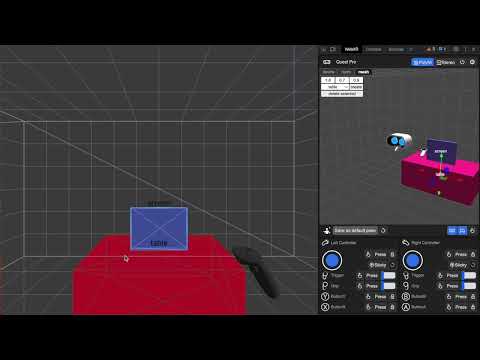
Immersive Web Emulator helps WebXR developers build and test Meta Quest browser experiences from a desktop Chromium browser, without needing a physical headset for every iteration. IWE 2.0 uses an explicit per-site workflow. Pin the Immersive Web Emulator button to your browser toolbar, open a WebXR page, then click the IWE button to enable emulation for that site. The page reloads with a simulated WebXR runtime, Meta Quest device profile, in-page live controls, and optional mixed reality environment data. Key Features - Simulate Meta Quest WebXR support on selected pages - Enter immersive VR/AR sessions from desktop Chromium-based browser - Move and rotate the headset, controllers, and hands from the in-page overlay - Simulate controller buttons, triggers, grips, thumbsticks, hand poses, and pinch input - Switch between controller and hand-tracking input modes - Configure persistent defaults in DevTools > WebXR, including device, environment, stereo rendering, IPD, and FOV - Test WebXR features including gamepads, hands, hit test, plane/mesh detection, anchors, and synthetic environments - Optional local bridge for coding agents and automation tools to inspect and drive the emulator during development How to Use 1. Install the extension and pin Immersive Web Emulator to the toolbar. 2. Open a WebXR app, such as: https://threejs.org/examples/webxr_xr_cubes 3. Click the IWE toolbar button to enable emulation for the current site. 4. After the page reloads, use the in-page overlay to control the simulated headset and inputs. 5. Open DevTools > WebXR to adjust persistent emulator settings. Unlike earlier versions, IWE no longer turns on automatically for every page. Emulation is enabled only for sites where you activate it with the toolbar button. Developer Resources https://github.com/meta-quest/immersive-web-emulation-runtime
4.7 out of 525 ratings
Details
- Version2.0.0
- UpdatedJuly 9, 2026
- Offered byMeta
- Size10.12MiB
- LanguagesEnglish
- DeveloperMeta Platforms, INC.
1 Meta Way Menlo Park, CA 94025 USEmail
extensions@fb.comPhone
+1 650-543-4800 - TraderThis developer has identified itself as a trader per the definition from the European Union and committed to only offer products or services that comply with EU laws.
- D-U-N-S196337864
Privacy

This developer declares that your data is
- Not being sold to third parties, outside of the approved use cases
- Not being used or transferred for purposes that are unrelated to the item's core functionality
- Not being used or transferred to determine creditworthiness or for lending purposes
Support
For help with questions, suggestions, or problems, visit the developer's support site