

HostLens – Airbnb Comps, Pricing & Market Research

Overview
Compare your Airbnb listing to local comps: price, estimated occupancy, amenities, reviews. STR market research and reports.
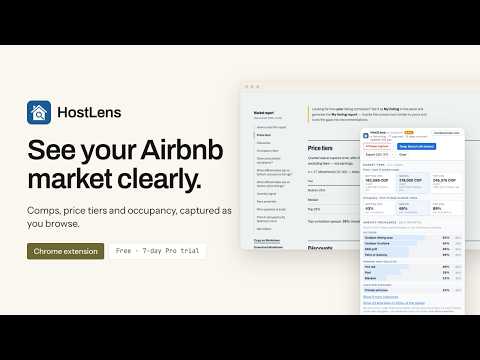
Compare your Airbnb listing against the real comparable listings in your market. HostLens captures the comps from an Airbnb search, then shows where your listing sits on price, estimated occupancy, rating, reviews, photos and amenities, and which gaps are worth closing. Built for short-term rental (STR) hosts, co-hosts, property managers, consultants and listing auditors. YOUR LISTING VS. THE COMPS Import your listings in one click (or mark one with 🏠), set your filters to the segment you compete in (bedrooms, guests, room type, price, amenities), and download the My listing report: your percentile on every metric against exactly the comps on screen, the gaps between you and the top of the market, and recommendations. Each recommendation shows its evidence and how many comps it is based on, so a client or owner can check it. HOW IT WORKS 1. Browse an Airbnb search as you normally would. HostLens captures every listing you scroll past (price, rating, reviews, bedrooms, badges) into a side panel you can filter, sort and export. With Pro, one click walks every page of the search for you. 2. Run Deep Search on the comps that matter. HostLens reads each listing's detail page and public calendar to add the full amenity list, guest capacity, room type, sub-ratings, Superhost status and a 4-month estimated occupancy. 3. Download a report: the My listing report for your own listing, or the market report for the whole area. Both are described below. WHO IT'S FOR • Hosts and co-hosts pricing or improving a listing • Property managers benchmarking a portfolio against the local competition • STR consultants and listing auditors who need evidence for a client • Investors and realtors sizing up a market before buying or pitching KEY FEATURES Airbnb shows comps one card at a time. Setting a price, choosing which amenity to add, or answering an owner who asks "are we competitive?" usually means hours of scrolling and a spreadsheet, or a guess. HostLens turns the search you are already doing into a set of comps you can measure. • No more copying comps into a spreadsheet. Every listing you scroll past in an Airbnb search or map is captured automatically, with price, rating, reviews, bedrooms and badges. • Check whether your price is in line. See what the cheapest 25%, the middle and the top 25% of your comps charge per night or per month after listed discounts, and where your price sits. • Compare like with like. Filter by bedrooms, guests, room type, price, rating, host or amenities, and every benchmark recalculates for the segment you actually compete in. • See how busy the market is (Pro). Deep Search reads each comp's public calendar to estimate occupancy for the next 4 months. It also adds the full amenity list, guest capacity, room type, sub-ratings and Superhost status. • Find your amenity gaps (Pro). See which amenities are standard, contested or rare among your comps, so you know what guests here expect. • See which part of town is busiest. The map splits your search into nine areas, such as north-west or centre, and shows how many listings each one has and their median price. With Deep Search it also ranks the areas by estimated occupancy, and flags any area that is busier than the market without having more listings than the typical area. You can open any area on a street map to see exactly where it is. • Understand discounting. See how many comps discount, how deep the discounts go, and how yours compares. • Capture a whole market in one click (Pro). HostLens walks every page of the search for you. • Take the data anywhere. Export exactly the rows on screen to CSV. HOW THE REPORTS HELP • The My listing report answers "how does my listing stack up, and what should I fix first?" It shows your percentile on price, estimated occupancy, rating, reviews, photos and amenities against exactly the comps on screen, the listings priced within 15% of yours, and how your area of the map compares with the rest. It also checks your listing against the amenities common among the busiest quarter of comps. Recommendations are ranked by the size of the gap, and each one shows its evidence and how many comps it is based on. • The market report answers "is this a good market, and what does it take to compete?" It covers market strength and estimated occupancy by month, what listings charge and whether pricier listings show lower occupancy, which size is busiest, who discounts, which amenities are common among the busiest listings, where ratings separate listings, and minimum stays. Its map ranks each area by estimated occupancy, gives its median price and listing count, and points out where demand outpaces supply. Each section opens with a one-sentence verdict and gives its sample size. • Both reports are made to share. Each downloads as a single page that works offline, so you can send it to a client, owner or investor. Each also comes as a Markdown copy you can paste into an AI assistant for a second opinion. FREE AND PRO Free, with no daily limits: capture, comps, filters, price tiers, discounts, Import my listings, CSV export, and both reports (sections that need Deep Search data say so). Pro adds Deep Search, occupancy tiers, amenity analysis and capture all pages. A 7-day free trial starts the first time you click Deep Search, with Google sign-in. No card required. PRIVACY HostLens runs only on Airbnb's own domains. Your captured listings are stored in your browser, never on our servers. Sign-in is used only for the Pro trial and billing. HONEST NUMBERS Occupancy is an estimate from each listing's public calendar. Booked and host-blocked days look the same, so treat it as an upper bound. HostLens shows no revenue data. Amenities are self-reported by hosts. Every insight describes what your comps have in common; none claims cause and effect. HostLens is an independent tool and is not affiliated with or endorsed by Airbnb. VERSION UPDATES: Newest first. One line per user-visible change, written for hosts, not developers. **Oct 23, 2026** - feat: In the market report, you can open each area of the map on a street map to see exactly where it is. - feat: Plans and prices now open on guayasoft.co. **Oct 21, 2026** - feat: The market report now shows estimated occupancy for each of the next four months. - feat: The panel's actions are now one Capture → Deepen → Report strip. **Oct 20, 2026** - feat: Redesigned the market report around the questions hosts ask, with a verdict and a chart per section, a map of where demand outpaces supply, and the most a listing here could book in a month. **Sep 23, 2026** - feat: The report now analyses discounts — how many comps discount, how deep, and whether discounted listings differ — and compares your listing's discount to the market. **Sep 3, 2026** - feat: Added auto-paginate (walks Airbnb's own search pager) and upgraded the Markdown report. **Aug 26, 2026** - feat: Enhanced amenity filtering with positive/negative options and improved Tier 2 record validation. **Aug 15, 2026** - feat: Improved filter options, added room type and host filter. - feat: HostLens can now generate a Markdown report with common statistical analysis run from the captured listings.
5 out of 52 ratings
Details
- Version1.3.2
- UpdatedOctober 25, 2026
- FeaturesOffers in-app purchases
- Size361KiB
- LanguagesEnglish (United States)
- DeveloperWebsite
Email
support@guayasoft.co - Non-traderThis developer has not identified itself as a trader. For consumers in the European Union, please note that consumer rights do not apply to contracts between you and this developer.
Privacy

HostLens – Airbnb Comps, Pricing & Market Research has disclosed the following information regarding the collection and usage of your data. More detailed information can be found in the developer's privacy policy.
HostLens – Airbnb Comps, Pricing & Market Research handles the following:
This developer declares that your data is
- Not being sold to third parties, outside of the approved use cases
- Not being used or transferred for purposes that are unrelated to the item's core functionality
- Not being used or transferred to determine creditworthiness or for lending purposes