


Overview
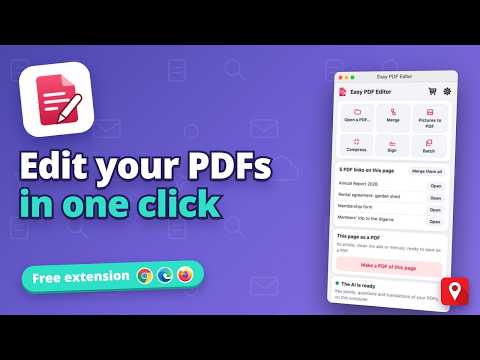
Edit, sign, merge, split and convert PDFs right on your computer: nothing is uploaded. Fill in forms, compress, add page numbers.
★★★★★ Edit your PDFs in one click 📌 right on your computer, nothing uploaded 🚨 Sign a contract, fill in a form, merge your tickets into one file or pull out the pages you need, without sending your files anywhere 💬 Read with dark mode and read-aloud, annotate, add page numbers and a watermark, turn pictures into a PDF and back 📄 No account, no daily limits and no watermark on your files: the free tools stay free ⚡ FEATURES ✔ Read any PDF: zoom, page thumbnails, search; it reopens at the last page you read 📖 ✔ Merge, split, reorder, rotate, delete and extract pages 🧩 ✔ Fill in forms, and sign: draw, type or use a picture of your signature ✍️ ✔ Annotate: text boxes, highlights, pen, rectangles and white-out 🖍️ ✔ Images to PDF, and pages to PNG or JPEG pictures 🖼️ ✔ Compress, add page numbers and a watermark 📉 ✔ Save into the same file, or download a copy 💾 ✔ Dark reading mode, and read aloud with the voices on your computer 🌙 ✔ AI key points of a PDF, with the browser's built-in AI, on your computer 🧠 ✔ Right-click a PDF link: Open with Easy PDF Editor · Alt+Shift+P ⌨️ ✔ Private: your files never leave your computer, and it works offline 🔒 ✔ Light: one page in your browser, easy on CPU and RAM 🍃 PREMIUM FEATURES ⭐ Premium Level 1 · free with 3 of our extensions installed ✨ The same tool on many files at once 📦 ✨ Strong compression: the pictures made smaller too 🗜️ ✨ Add a password (AES-256) or remove one 🔐 ✨ Searchable scans (OCR) in English, Portuguese and Spanish, read on your computer 🔍 ✨ Web page to PDF, clean and ready to save 🌐 ✨ Watermark presets and Bates numbering 🏷️ ✨ Bookmarks and document info 📑 ✨ Ask this PDF, and translate a whole document, with the browser's built-in AI 💬 ✨ Backup & restore of your settings and signatures 💾 ✨ Themes: Default, Dark, Ocean, Sunset 🎨 🔕 No reminders to install our other extensions 👑 Premium Level 2 · optional, paid (yearly or lifetime), one purchase for all our extensions, in all your browsers ✅ Everything in Level 1, without installing other extensions ✨ True redaction: what you black out is really gone ⬛ ✨ Find personal data: emails, phone numbers, IBANs, card numbers 🕵️ ✨ Remove hidden data: metadata, attachments, scripts and hidden layers 🧹 ✨ Compare two PDFs, page by page 🔀 ✨ Batch OCR: many scans made searchable in one go 📚 ✨ Export the text to Word (.docx) 📝 🚫 No pop-ups or promotions 🚀 New Premium features, with early access · 💬 Priority support by email All other features are free. Premium Level 2 is sold by WWEvents, not by Google, on our website, with payments by Stripe. Prices are on the Premium page in the extension. Terms of sale and refunds: https://jitt.wwevents.fun/privacy-policy/#terms-of-sale 📌 This extension includes promotion to other WWEVENTS extensions to increase awareness of other work that we produce, you may find some very useful 😀 All our extensions are free to install and use; only Premium Level 2 is paid 📌 ———————————————————— ABOUT WWEVENTS ———————————————————— 💎 Building Apps and Extensions for Chrome and Android 🔥📣 ———————————————————— CHANGELOG & RELEASE NOTES ———————————————————— 📔 Available on the product page: https://jitt.wwevents.fun/project/easy-pdf-editor/#changelog ———————————————————— LEGAL ———————————————————— Easy PDF Editor is a trademark of WWEvents. ———————————————————— PRIVACY POLICY & TERMS OF SERVICE ———————————————————— By installing this product you agree to our privacy policy & terms of service: https://jitt.wwevents.fun/privacy-policy/ ———————————————————— REQUIRED PERMISSIONS ———————————————————— You may consult the list of permissions and the reason why they are required on the product page: https://jitt.wwevents.fun/project/easy-pdf-editor/#permissions “storage” – Used to save your settings, signatures and recent files on your computer. “unlimitedStorage” – Storage is limited to 10MB of data, which may not be enough for your signatures and presets. “downloads” – Used to save the PDFs and pictures you make to your Downloads folder. “contextMenus” – Allows adding more settings when you right-click a PDF link or the App icon. “notifications” – Used to send desktop notifications. “alarms” – Used for background jobs, such as cleaning temporary files. “scripting” – Used to find the PDF links of a page and to make a PDF of the page. “tabs” – Used to open the PDF of the tab you're on in the editor. “system.display” – Used to open the editor at a size that fits your screen. “declarativeNetRequest” – Used to open the PDF links you click in the editor, when you turn it on. “host_permissions” – Permission to access all hosts/domains, to open a PDF from any site. Your files are never uploaded. Also used to show the Tips - Tricks - News and to allow intercommunication with other WWEvents Apps. “all_urls” – We cannot predict ahead of time which sites you will visit, so the extension works on any page. ———————————————————— FINAL NOTES ———————————————————— This information is also available inside the App: Options -> About
0 out of 5No ratings
Details
- Version1.6
- UpdatedNovember 25, 2026
- FeaturesOffers in-app purchases
- Size13.76MiB
- Languages54 languages
- DeveloperWebsite
Email
contact@wwevents.fun - Non-traderThis developer has not identified itself as a trader. For consumers in the European Union, please note that consumer rights do not apply to contracts between you and this developer.
Privacy

Easy PDF Editor has disclosed the following information regarding the collection and usage of your data. More detailed information can be found in the developer's privacy policy.
Easy PDF Editor handles the following:
This developer declares that your data is
- Not being sold to third parties, outside of the approved use cases
- Not being used or transferred for purposes that are unrelated to the item's core functionality
- Not being used or transferred to determine creditworthiness or for lending purposes
Support
For help with questions, suggestions, or problems, please open this page on your desktop browser