

Lynx

Overview
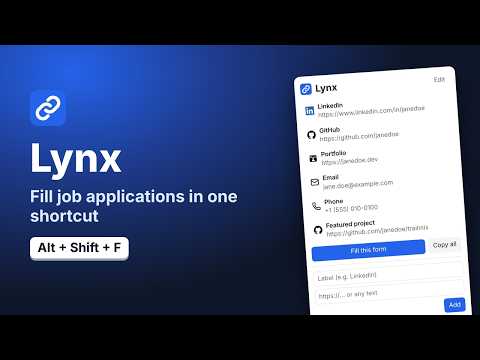
Keep your social and portfolio links one click away for job applications and other forms.
Save your profile links once. On a job application, press Alt+Shift+F and Lynx fills the matching empty fields. It only touches a page when you ask, and it never sends your links anywhere. Fill a form with one shortcut Press Alt+Shift+F, or click "Fill this form" in the popup. Each filled field glows briefly so you can check it, and anything you've already typed is left alone. Copy any link with a click For questions Lynx can't fill, like "Share a project you're proud of", open the popup and click a link to copy it. You can also press 1 to 9 to copy by position, or use "Copy all" for a list of every link. Insert from the right-click menu Right-click any text field, choose "Insert link from Lynx", and pick a link. Private by design • Lynx never runs on a page in the background. It only acts when you use the shortcut, the popup, or the right-click menu. • It doesn't need permission to read the sites you visit. • Your links are stored in Chrome's extension storage. Lynx makes no network requests and has no analytics or tracking. Some company career pages embed their application form from a job-board site. If you want Lynx to fill those, you can allow access to a few popular job-board sites from the popup. It's off by default. Lynx follows your system's light or dark mode and shows an icon next to each saved link. You can change its keyboard shortcuts at chrome://extensions/shortcuts. Lynx is open source under the MIT license.
0 out of 5No ratings
Details
- Version0.1.1
- UpdatedNovember 5, 2026
- Offered bybarrettsrb@gmail.com
- Size42.52KiB
- LanguagesEnglish
- Developer
Email
contact@spencer-barrett.com - Non-traderThis developer has not identified itself as a trader. For consumers in the European Union, please note that consumer rights do not apply to contracts between you and this developer.
Privacy

Lynx has disclosed the following information regarding the collection and usage of your data. More detailed information can be found in the developer's privacy policy.
Lynx handles the following:
This developer declares that your data is
- Not being sold to third parties, outside of the approved use cases
- Not being used or transferred for purposes that are unrelated to the item's core functionality
- Not being used or transferred to determine creditworthiness or for lending purposes