

LitRank: Literature Review for Google Scholar

Overview
Journal ranks on Google Scholar, Scopus, Web of Science and more; a search log for systematic reviews; save papers and PDFs. Free.
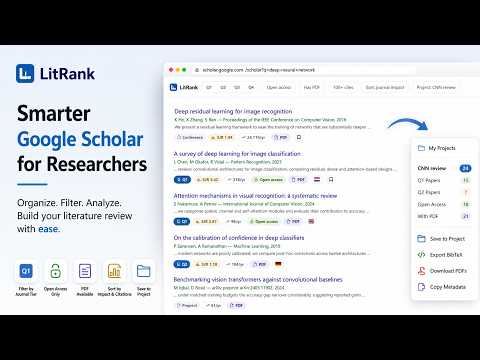
LitRank is a free browser extension that shows each paper's journal quartile and SJR score on Google Scholar and other research databases, keeps a log of your searches for a systematic or scoping review, and summarises any Google Scholar author profile. It has no account and no server: everything stays on your device. Built for researchers, PhD students and librarians who need to judge where a paper was published, and to report exactly how they searched. ────────────────────────────── JOURNAL RANKS WHERE YOU SEARCH ────────────────────────────── Every Google Scholar result gets a badge with its journal's SJR quartile (Q1 to Q4), SJR score, h-index, open-access status and country of publication, plus the paper's citations per year. The ranks come from Scimago Journal Rank 2025, bundled inside the extension and covering over 31,000 ranked journals, with OpenAlex's 2-year citedness alongside. The same badges appear on Scopus, Web of Science, ScienceDirect and OpenAlex results, on the sites you turn on. Filters Google Scholar does not have: • Quartile: show only Q1 and Q2 journals • Minimum citations • Document type: journal articles, conference papers, preprints, theses, book chapters • Open access only, or only results with a PDF • Hide papers you have already saved • Sort by journal rank or by citations, and load more results in place ──────────────────────────── A SEARCH LOG FOR YOUR REVIEW ──────────────────────────── PRISMA 2020 and PRISMA-S ask a systematic review to report every search: the database, the exact search string, the filters, the number of results and the date. LitRank records these as you search, so the Methods section and the search appendix are ready when you are. • Works on 38 databases and publisher websites, including PubMed, Web of Science, Scopus and Embase, each turned on by you, one at a time • Records the query exactly as the database ran it where the database shows it, and marks it "as typed" where it cannot • Counts database and website searches separately, as PRISMA 2020 asks • Keeps refined searches linked to the search they narrowed • Exports a ready-to-edit Methods paragraph, a table, a search appendix or CSV, with a checklist of what PRISMA-S still needs • Imports the search history pages of Web of Science, Scopus and ProQuest • Works through your university library's proxy address • Any other site: right-click its results page and choose "Log this search" ────────────────────────────── GOOGLE SCHOLAR PROFILE ANALYSIS ────────────────────────────── On any Google Scholar author profile, press "Analyse this author" for a summary of the whole record: • Total citations, h-index, i10-index, first-author papers and the median SJR of the journals • The share of papers in Q1, Q2, Q3, Q4 and unranked venues, and the share of citations each brings • Citations and papers per year • The most cited papers, research keywords and subject areas It is worked out in your browser from what the profile already shows. It describes where the work appeared; it ranks no one against anyone. ───────────────────── SAVE PAPERS AND PDFs ───────────────────── • Save any Google Scholar result into a named folder with one click • Save any article page from any publisher: right-click, or Alt+Shift+L • Save a paper's PDF through your own library access, one file at a time • Export BibTeX, CSV or JSON for Zotero, Mendeley or EndNote • Fill in missing volume, issue, pages and authors from Crossref • See each folder's quartile mix, median SJR, publication years and venues ────────────────────────────────── IT SHOWS NOTHING RATHER THAN GUESS ────────────────────────────────── Google Scholar abbreviates and truncates journal names. LitRank matches them against the ranking data inside the extension, and where more than one journal could fit, it shows no badge at all. A search it cannot read exactly is marked as such, never passed off as exact. A tool that quietly guesses is worse than one that admits the gap, because from the outside you cannot tell the two apart. ─────── PRIVACY ─────── LitRank has no server, no account and no analytics. • The ranking data ships inside the extension and is read on your machine • Your papers and your search log live in your browser's storage • The search log is off until you turn it on, and your browser asks before LitRank reads each site • The only outbound request is to Crossref, and only when you press "Fetch metadata" Full policy: https://github.com/riponcm/LitRank/blob/main/PRIVACY.md ────────────────────────── FREQUENTLY ASKED QUESTIONS ────────────────────────── Q: How do I see journal quartiles on Google Scholar? A: Install LitRank and search Google Scholar as usual. Each result shows its journal's SJR quartile and score beside it; no account or setup is needed. Q: Where does the ranking data come from? A: From Scimago Journal Rank (SJR) 2025, which is computed from Scopus data, with citedness figures from OpenAlex. The data is bundled inside the extension, so no lookup leaves your computer. Q: Does LitRank show the Journal Impact Factor? A: No. It shows SJR quartiles and scores. The Journal Impact Factor is a Clarivate metric that cannot be redistributed in a free extension, and the two are on different scales. Q: How does LitRank help with PRISMA-S reporting? A: It records each search's database, exact query, filters, result count and date as you run it, then exports a Methods paragraph and a search appendix, and lists which PRISMA-S items are still missing. Q: Does the search log send my searches anywhere? A: No. It reads the results page you are already looking at and keeps the record in your browser. It never runs searches, clicks or downloads for you. Q: Does it work with my university library login? A: Yes. PDFs are saved through your own browser session, and the search log and badges work on databases reached through your library's proxy address once you add it. Q: Why does a journal have no badge? A: Because it could not be identified exactly, usually an abbreviated name or a name two journals share, or because the venue is not a ranked journal (a preprint, thesis or book chapter). LitRank leaves it blank rather than risk showing another journal's rank. Q: Is LitRank free? A: Yes. There is no paid tier, no trial and no advertising, and none is planned. Q: Is LitRank affiliated with Google, Clarivate or Elsevier? A: No. LitRank is an independent extension. Google Scholar, Web of Science, Scopus, ScienceDirect and the other names mentioned are trademarks of their respective owners. ─────── SUPPORT ─────── Found a wrong quartile, or a site that misreads a search? Open an issue with the journal name or the page address: https://github.com/riponcm/LitRank/issues LitRank is made by Matily.org: https://matily.org/litrank/
5 out of 51 rating
Details
- Version1.9.0
- UpdatedOctober 28, 2026
- Size2.0MiB
- LanguagesEnglish (United States)
- DeveloperWebsite
Email
support@matily.org - Non-traderThis developer has not identified itself as a trader. For consumers in the European Union, please note that consumer rights do not apply to contracts between you and this developer.
Privacy

This developer declares that your data is
- Not being sold to third parties, outside of the approved use cases
- Not being used or transferred for purposes that are unrelated to the item's core functionality
- Not being used or transferred to determine creditworthiness or for lending purposes
Support
For help with questions, suggestions, or problems, visit the developer's support site