

CentralTab - New Tab Page, Speed Dial Dashboard with AI

Overview
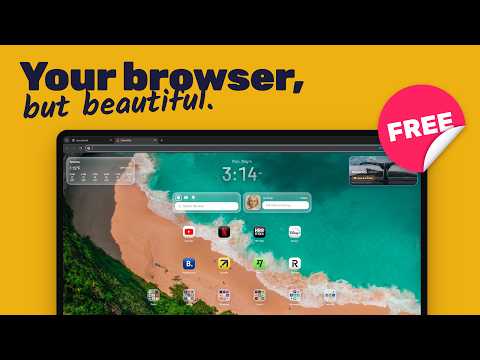
A beautiful, customizable new tab page with speed dial, widgets and wallpapers.
🚀 CentralTab turns every new tab into a calm, fast start page - a customizable speed dial dashboard with AI, built for focus and quick access. ✨ Meet CentralTab: a clean new tab page that replaces the blank tab with a start page you'll actually use. Pin your most-visited sites as a modern speed dial, group them into folders, and open your browser already knowing where you're headed. Whether you're planning a trip, switching between work tools, or just taming tab overload, CentralTab keeps everything one click away. 🤖💡 ⭐ Why you'll love it ✅ A new tab that feels like your personal dashboard - open the browser and your day is right in front of you. ⚡ A speed dial you control - drag and drop tiles, group them into folders, and arrange everything exactly how you like. 🪄 Ready-made presets - choose one of 12 designed start pages with shortcuts, widgets, and a matching wallpaper, and switch in one click. Your previous layout is saved, so you can restore it anytime. 📁 Built-in organization - create themed folders (Work, Travel, Finance, Shopping) and keep your favorite links a single click away. 🧭 Less friction - less searching, fewer distractions, more momentum. 🤖 AI when you want it - quick answers, ideas, and a little help with your workflow, without the clutter. 🖼️ Beautiful wallpapers - pick a clean minimal look or a fresh daily backdrop that makes every new tab feel like yours. 🌈 🎬 Live wallpapers - calm, looping video backgrounds that bring your new tab to life. A video downloads only when you pick it, and it pauses while you're on another tab. 🧩 Designed for real routines CentralTab isn't just pretty - it's practical. Use it as your daily start page for: 💼 Work - internal tools, docs, tickets, email, and calendars, all a click away. ✈️ Travel - flights, hotels, maps, and itineraries, ready in seconds. 📚 Study - course portals, notes, and research, neatly grouped. 🏡 Home - banking, bills, shopping, and entertainment in one place. 🤖 AI on tap - ask, plan, and think faster, right where you start browsing. 🧹 A simple way to tame tab chaos If you keep reopening the same sites and end up with 20+ tabs, CentralTab helps you reset. Your new tab becomes home base: open a tab, pick a tile, move on. Real momentum - without forcing you into a rigid system. 🎯 🔗 Everything in one place CentralTab works like a lightweight bookmark hub that stays out of your way. Keep your essentials up front, tuck the rest into folders, and treat your new tab as a curated start page instead of a messy bookmark dump. Build zones for daily essentials, weekly tasks, and long-term links. 🗂️ 🛠️ Setups you can copy in 2 minutes 1) 💼 "Work" start page 🔹 Speed dial: Email, Calendar, Docs, Tickets, Chat 📂 Folder: Finance + Invoices 🎉 Result: a focused dashboard that keeps you on task. 🤖 Bonus: add an AI step to your routine - plan your day in 30 seconds. 2) ✈️ "Travel" new tab 🔹 Quick links: Flights, Hotels, Maps, Weather, Check-in 📂 Folder: Bookings + confirmations 🔥 Result: the trip-planning view you always wished you had. 🤖 Bonus: use AI to brainstorm packing lists and itineraries. 3) 🧘 "Minimal" dashboard 🔹 Just your top 8 links 🌅 A calm wallpaper and a clean look ✅ Result: momentum without the visual noise. 🤖 Bonus: keep AI handy - but only when you actually need it. 🎨 Make it yours 🧩 Custom icons and clear labels for every tile 📁 Folders for category-based navigation 🧱 A flexible grid that adapts to your screen and style 🖼️ Wallpapers to match your mood: minimal, colorful, or photo-based 🎬 Live wallpapers with gentle motion, or your own video as the background ✨ A clean layout that keeps your attention where it matters 🤖 An AI-friendly workflow that keeps your tools in one place 🛡️ Privacy-friendly by design Your new tab should be yours. CentralTab is built to be lightweight and respectful - we focus on a fast, calm experience, not on collecting more than we need. 🔒 🤝 Affiliate disclosure CentralTab is free, and stays free thanks to a small number of affiliate partnerships. Some shortcuts in CentralTab may contain affiliate links. When you click one of these shortcuts and complete a qualifying action on the partner's site - such as signing up or making a purchase - we may earn a small commission. This comes at no extra cost to you and never affects the price you pay. We only partner with services we'd genuinely recommend, and the choice of which shortcuts to use is always yours. You can read the full disclosure anytime in CentralTab's settings. ⏱️ Get started in 60 seconds 1️⃣ Install CentralTab and open a new tab. 2️⃣ Add your first 6 links (work + personal). 3️⃣ Create one folder (e.g. "Travel" or "Work Tools"). 4️⃣ Set a wallpaper you love. 5️⃣ Use your speed dial daily and feel the momentum build. 🚀 🤖 Add one simple AI habit - a daily plan, quick notes, or capturing ideas. If you've tried other new tab tools, CentralTab will feel familiar - just calmer and more focused. It's the start page you'll actually keep: fast, tidy, customizable, and built for productivity, with AI support whenever you want it. 💪🤖 ❓ FAQ 🔁 Does it replace your browser's new tab? Yes - CentralTab becomes your start page and dashboard, with a customizable speed dial. ⭐ Is it a bookmark manager? It's a quick-access hub with folders and shortcuts - simpler and faster. 🤖 Is AI included? Yes - CentralTab fits right into an AI-powered workflow and can offer AI assistance depending on your setup. 🖼️ Can I change the wallpaper anytime? Yes - swap the background in seconds. 🎬 Are there animated wallpapers? Yes - pick a live wallpaper for a looping video background, or upload your own MP4 or WebM video. 🪄 Can I start from a ready-made layout? Yes - pick one of 12 presets in Settings or on first launch. Your widget data stays, and your previous layout can be restored with one click. 👉 Get started today: install CentralTab, build your first dashboard, and keep your favorite links on a clean, calm new tab - with a fresh wallpaper and AI support whenever you need it. 🚀🤖
4.9 out of 58 ratings
Details
- Version2.0
- UpdatedOctober 1, 2026
- Size9.21MiB
- Languages24 languages
- DeveloperWebsite
Email
peter@sixtype.com - Non-traderThis developer has not identified itself as a trader. For consumers in the European Union, please note that consumer rights do not apply to contracts between you and this developer.
Privacy

This developer declares that your data is
- Not being sold to third parties, outside of the approved use cases
- Not being used or transferred for purposes that are unrelated to the item's core functionality
- Not being used or transferred to determine creditworthiness or for lending purposes
Support
For help with questions, suggestions, or problems, visit the developer's support site