

CentralCSP - Content-Security-Policy (CSP) Builder

Overview
Author, debug, and roll out Content-Security-Policy headers without redeploying.
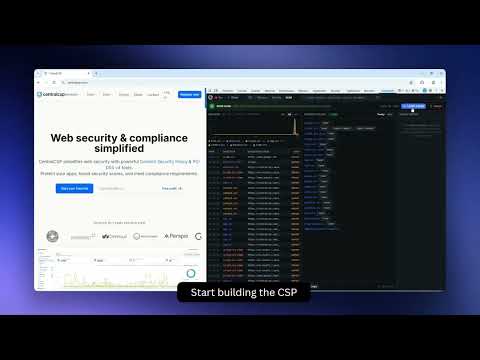
Author, debug, and roll out Content-Security-Policy headers, without a deploy. CentralCSP turns your browser into a CSP workbench. Iterate against the real production site, watch every violation in real time, and synthesise a working header from observed traffic, all in one session, with zero infrastructure. ━━━━━━━━━━━━━━━━━━━━━━━━━━━━ QUICK START — 60 SECONDS ━━━━━━━━━━━━━━━━━━━━━━━━━━━━ 1. Open the website you want to work on, then click the CentralCSP icon in your toolbar and press "Enable for this site". The extension is OFF on every origin by default, you opt in per site. 2. Pick a mode at the top of the popup: • OBSERVE - see your existing CSP at work without touching anything. • REWRITE - test a candidate policy live against the real site. • BUILD - start from a strict base and let the extension discover the policy for you as you click through. 3. Use the page normally. Violations stream into the popup in real time. Counters and a live chart update as you browse. 4. Press F12 to open DevTools, then click the "CentralCSP" tab for the full panel: report stream, violation chart, policy editor, and the working CSP ready to copy. 5. When the policy looks right, click "Copy". Paste it into your server config, your CDN, or into centralcsp.com for long-running monitoring. Done. ━━━━━━━━━━━━━━━━━━━━━━━━━━━━ WHAT IT DOES ━━━━━━━━━━━━━━━━━━━━━━━━━━━━ • OBSERVE - watch your existing Content-Security-Policy catch (or miss) violations as you browse. No header changes, no production risk. • REWRITE - swap in a policy you're authoring, in real time. Enforce or report-only. Append to your existing policy or fully replace it. • BUILD - start from a strict 'none'-everywhere base. Click through your app. Watch the CSP auto-grow as violations are observed. End the session with a copy-pasteable header that allow-lists exactly what your site needs and nothing more. ━━━━━━━━━━━━━━━━━━━━━━━━━━━━ WHY IT'S DIFFERENT ━━━━━━━━━━━━━━━━━━━━━━━━━━━━ Other CSP tools work against a crawl, a staging environment, or your curl output. CentralCSP works against the actual page, with the actual session, the actual third-party scripts, the actual personalisation. The CSP you derive is the CSP that will work in production, because that's where you derived it. No deploys between iterations. No reporting endpoint to wire up first. No CI gate to wait on. Save the policy, reload the page, see the result in five seconds. The feedback loop is what makes a real CSP possible to ship. ━━━━━━━━━━━━━━━━━━━━━━━━━━━━ WHO IT'S FOR ━━━━━━━━━━━━━━━━━━━━━━━━━━━━ Web engineers, platform teams, and application-security folks, anyone who has been told "we need a CSP" and wants the answer in hours instead of weeks. Typical scenarios: • You got an audit finding and need a working CSP by Friday. • Your CSP broke a production flow at 3am and you need to diff-test a fix without going through a deploy. • You're tightening a permissive 'default-src self *' policy down to a real allowlist, directive by directive. • You're adopting PCI DSS v4.0 and need evidence that every script on your payment pages is explicitly allow-listed. • You inherited a site with no CSP and have no idea where to start. ━━━━━━━━━━━━━━━━━━━━━━━━━━━━ PRIVACY — WHAT WE DON'T DO ━━━━━━━━━━━━━━━━━━━━━━━━━━━━ Everything stays in your browser. Specifically: • No telemetry. No analytics, no usage metrics, no error reporting on your browsing. • No account, no sign-in. The extension has no auth flow. • No outbound traffic about the sites you visit. Captured reports, draft policies, and per-site settings all live locally in chrome.storage and stay there until you uninstall. • No communication with centralcsp.com at runtime. The extension never reads centralcsp.com cookies or session state. The one exception, called out honestly: the extension's own UI reports its own CSP violations to extension.report.centralcsp.com, that's us watching our own UI for regressions, NOT triggered by any website you visit. ━━━━━━━━━━━━━━━━━━━━━━━━━━━━ PERMISSIONS ━━━━━━━━━━━━━━━━━━━━━━━━━━━━ CentralCSP rewrites response headers, which on Manifest V3 requires read/change access on the websites you choose to enable. The extension is OFF by default on every origin, you opt in per site through the popup. ━━━━━━━━━━━━━━━━━━━━━━━━━━━━ PAIRS WITH CENTRALCSP.COM ━━━━━━━━━━━━━━━━━━━━━━━━━━━━ Once you have a policy you trust, paste it into centralcsp.com to roll it out across environments, monitor violations long-term, get on-call alerts when production regresses, and stay PCI DSS v4.0 compliant. The extension is the iteration loop. CentralCSP is the steady-state. You do NOT need a centralcsp.com account to use the extension, they're independent tools that happen to fit together. ━━━━━━━━━━━━━━━━━━━━━━━━━━━━ Free, no account, no telemetry. Your first working CSP is one install away.
5 out of 53 ratings
Details
- Version2.0.0
- UpdatedMay 17, 2026
- Size680KiB
- LanguagesEnglish
- DeveloperCentralSaaSWebsite
1 All. des Frênes Meylan 38240 FREmail
contact@centralcsp.comPhone
+33 6 04 13 37 81 - TraderThis developer has identified itself as a trader per the definition from the European Union and committed to only offer products or services that comply with EU laws.
- D-U-N-S282218385
Privacy

This developer declares that your data is
- Not being sold to third parties, outside of the approved use cases
- Not being used or transferred for purposes that are unrelated to the item's core functionality
- Not being used or transferred to determine creditworthiness or for lending purposes
Support
For help with questions, suggestions, or problems, visit the developer's support site