

Access Database Viewer — Open MDB & ACCDB Files

Overview
Open, search & export Microsoft Access .mdb/.accdb files 100% locally: CSV, Excel, SQLite. No upload, no network access at all.
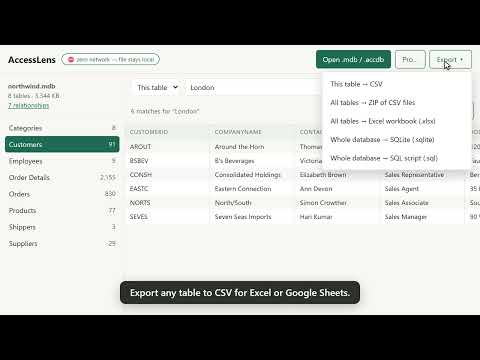
Open Microsoft Access database files without Microsoft Access, and get the data out. Open .mdb and .accdb files right in Chrome: on a Chromebook, on a Mac, or on a locked-down work laptop where you can't install software. The file never leaves your computer. Been handed a legacy .mdb or .accdb file (a vendor handoff, an old records export, a public data drop) and you have no Access licence? AccessLens opens it in a browser tab. Browse every table, search, see how the tables fit together, and export to CSV, Excel, SQLite or SQL. WHAT MAKES IT DIFFERENT ⛔ Zero network access, provably. This extension requests NO permissions of any kind. It cannot see your browsing, cannot touch other tabs, and cannot send anything anywhere. Your database never leaves your computer. You can check this yourself in the extension's details: the permissions list is empty. ✔ Every Access era: Access 97, 2000, 2002/2003 (.mdb) and 2007–2019 (.accdb). ✔ Opens password-protected and encrypted databases (Access 2010 RC4 and Office Agile encryption). The password is used locally and never stored. ✔ No artificial size limit for viewing. Large tables load in pages and scroll smoothly. (Practical limits depend on your computer's memory, because the file is processed locally.) ✔ Search inside any table, or across every table at once. ✔ Schema view: every column's type and size, plus the relationships between tables. ✔ Export any single table to CSV. Free, at any size, always. ✔ Export the whole database in one go: a ZIP of CSV files, an Excel workbook with one sheet per table, a SQLite database, or a SQL script. ✔ Works offline. It has no way to be online. FREE AND PRO Everything above is free for databases with up to 20 tables and 50,000 rows. For larger databases, exporting the whole database at once and searching across every table need AccessLens Pro: • Personal licence: $5.99, one-time, for one person's own non-work use • Business licence: $15, one-time, required whenever Pro is used for work (covers your team at one organisation) No subscription and no account. Exporting one table at a time to CSV stays free at any size, so you can always get your data out. The free features are free for everyone, including at work. Pro is sold by the developer of AccessLens through Payhip (payhip.com/b/U60Cu), not by Google. The full licence terms are on that page. Your licence key arrives in your receipt email and is checked on your own device; nothing is sent anywhere. Refunds: email phakeoa@gmail.com within 14 days of purchase for a full refund. ON A WORK LAPTOP? If your company manages Chrome, this page may show a "Request" button instead of "Add to Chrome". Use it, and give this reason: "AccessLens opens Microsoft Access files locally. It requests no permissions and has no network access, so files never leave this computer." Your IT admin can then approve it. Using Pro for work requires the Business licence. HONEST LIMITS • Read-only: AccessLens views and exports; it never modifies your file. • Multi-valued fields and attachment columns (an Access 2007+ feature) can't be displayed. They're shown as clearly marked placeholders and left out of exports. • Access forms, reports, macros and VBA are not shown: tables and data only. • Legacy Jet-era passwords (Access 97–2003) are a formality of that old format. Like Access itself, AccessLens opens those files without needing the password. Made for the IT generalist, the analyst, the records clerk: anyone who needs to see what's inside an Access file and get the data out.
0 out of 5No ratings
Details
- Version1.1.1
- UpdatedSeptember 29, 2026
- FeaturesOffers in-app purchases
- Offered byphakeoa
- Size618KiB
- LanguagesEnglish
- Developer
Email
phakeoa@gmail.com - Non-traderThis developer has not identified itself as a trader. For consumers in the European Union, please note that consumer rights do not apply to contracts between you and this developer.
Privacy

This developer declares that your data is
- Not being sold to third parties, outside of the approved use cases
- Not being used or transferred for purposes that are unrelated to the item's core functionality
- Not being used or transferred to determine creditworthiness or for lending purposes