

CEFR Reading Assistant – Learn Vocabulary While Reading
1 rating
)
Overview
Show difficult words near your selected text and save them for review.
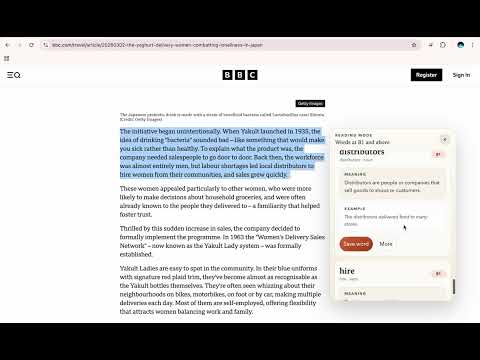
CEFR Reading Assistant helps English learners keep reading. Select text on a webpage and the extension shows only the words that are difficult for your CEFR level. Each word appears in a small bubble near the text, with a simple English meaning and a short example sentence. Use it for: - Reading news and articles without opening another tab - Focusing only on vocabulary that matches your level - Understanding words in the current context - Saving useful words for later review Main features: - CEFR level setting from A1 to C2 - Reading mode toggle - Automatic analysis when you select text - Right-click analysis - Bubble cards near the selected text - Simple English meanings and examples - Local saved word bank - Flashcard review mode with random order Privacy notes: - The extension analyzes only the text you select - Saved words and settings are stored locally in Chrome - Selected text may be sent to the extension backend and AI provider to generate meanings and examples
5 out of 51 rating
Details
- Version4.0.1
- UpdatedApril 13, 2026
- Offered byRyuto
- Size108KiB
- LanguagesEnglish
- Developer
Email
ryuto.2007.11.27@gmail.com - Non-traderThis developer has not identified itself as a trader. For consumers in the European Union, please note that consumer rights do not apply to contracts between you and this developer.
Privacy

CEFR Reading Assistant – Learn Vocabulary While Reading has disclosed the following information regarding the collection and usage of your data. More detailed information can be found in the developer's privacy policy.
CEFR Reading Assistant – Learn Vocabulary While Reading handles the following:
This developer declares that your data is
- Not being sold to third parties, outside of the approved use cases
- Not being used or transferred for purposes that are unrelated to the item's core functionality
- Not being used or transferred to determine creditworthiness or for lending purposes