

Pomo – Voice Timer, Stopwatch & Alarm

Overview
Voice-controlled Pomodoro timer, stopwatch and alarm. Say "set a 25 minute timer" and a floating digital clock does the rest.
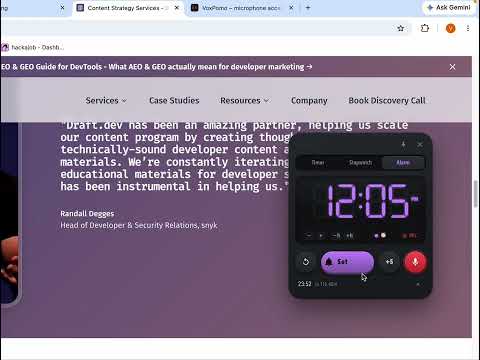
Pomo is a digital desk clock for your browser that you control by talking to it. Set a timer, run a stopwatch or schedule an alarm without touching the keyboard, and keep the clock floating over whatever you're working on. JUST SAY IT Press the mic button once and speak naturally: "Set a 25 minute timer" • "Start" • "Pause" • "Resume" • "Reset" "Add 5 minutes" • "Notify me halfway" • "How much time is left?" "Start stopwatch" • "Lap" • "Stop stopwatch" "Set an alarm for 3:30 pm" • "Alarm in 20 minutes" • "Snooze" Pomo confirms every command out loud in a natural voice, so you never have to look at the screen. Prefer silence? Turn spoken feedback off or add a wake word so only phrases starting with it are treated as commands. A CLOCK THAT FOLLOWS YOU The floating clock sits on top of any web page. Drag it wherever you like, collapse it to a small pill, or hide it entirely and watch the countdown on the toolbar badge instead. Open the toolbar popup for the full clock, alarms list and settings. THREE TOOLS, ONE DISPLAY Timer – any length from 1 to 99 minutes, adjustable while it runs. A halfway reminder is one voice command away. Stopwatch – start, stop, resume, reset and record laps. Alarm – a 12-hour LED display with AM/PM. Set it by voice or with the +/- buttons; it rings until you dismiss it, with a snooze button when you need five more minutes. DESIGNED LIKE THE REAL THING Glowing seven-segment digits, a matte case and tactile buttons give Pomo the look of a physical Pomodoro clock. The colour changes with what you're doing: ember orange for the timer, amber for the stopwatch, violet for alarms. KEYBOARD SHORTCUTS Alt+Shift+V (Ctrl+Shift+V on Mac) start or stop listening Alt+Shift+S (Ctrl+Shift+S on Mac) start or pause Alt+Shift+P (Ctrl+Shift+P on Mac) show or hide the floating clock All shortcuts can be changed at chrome://extensions/shortcuts. PRIVATE BY DESIGN Pomo has no servers and no account. The microphone is used only while listening is on, speech is converted to text by Chrome's built-in speech service, and nothing is recorded, stored or sent to the developer. Timers, alarms and settings are saved locally in your browser. Ideal for focused work sessions, cooking, workouts, studying, or anyone who wants a timer they can operate hands-free.
0 out of 5No ratings
Details
- Version1.0.0
- UpdatedSeptember 30, 2026
- Size39.16KiB
- LanguagesEnglish
- Developer
Email
meetvaishalibagul@gmail.com - Non-traderThis developer has not identified itself as a trader. For consumers in the European Union, please note that consumer rights do not apply to contracts between you and this developer.
Privacy

This developer declares that your data is
- Not being sold to third parties, outside of the approved use cases
- Not being used or transferred for purposes that are unrelated to the item's core functionality
- Not being used or transferred to determine creditworthiness or for lending purposes