


Overview
Capture, crop, and instantly translate any on-screen text, including images, with just one click.
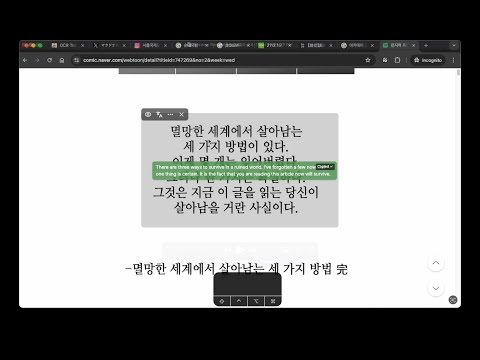
Translate text within images, videos, webcomics, and unselectable areas directly on your screen. OCR Translator is a Chrome extension that allows you to capture any part of your browser screen and overlay translated text directly onto the original image. Unlike standard translation tools that require selectable text, this extension utilizes advanced OCR (Optical Character Recognition) technology to extract and translate text embedded in images. It is highly useful for translating foreign language content in YouTube videos, webcomics (manga and manhwa), scanned PDFs, infographics, and social media posts. Key Features: - Capture & Translate: Easily crop a specific area on your screen to extract and translate the text within seconds. - Image-Based Translation: Works seamlessly on unselectable text, including images, video subtitles, scanned documents, and complex web layouts. - In-Place Overlay: Displays the translated text directly over the original content, maintaining the visual context for a better reading experience. - Export Options: Download the captured image along with the translated text overlay. How It Works: 1. Click the OCR Translator extension icon in your browser toolbar. 2. Drag and select the area on your screen containing the text you want to translate. 3. Read the translated text overlaid directly onto the original image. Supported Languages: The extension provides text recognition and translation for various languages, including English, Chinese, Japanese, Korean, Russian, French, German, Thai, Hindi, Turkish, and Polish.
4.2 out of 558 ratings
Details
- Version1.9.0
- UpdatedOctober 19, 2026
- FeaturesOffers in-app purchases
- Size520KiB
- Languages16 languages
- DeveloperWebsite
Email
iwanhae@gmail.com - Non-traderThis developer has not identified itself as a trader. For consumers in the European Union, please note that consumer rights do not apply to contracts between you and this developer.
Privacy

OCR Translator has disclosed the following information regarding the collection and usage of your data. More detailed information can be found in the developer's privacy policy.
OCR Translator handles the following:
This developer declares that your data is
- Not being sold to third parties, outside of the approved use cases
- Not being used or transferred for purposes that are unrelated to the item's core functionality
- Not being used or transferred to determine creditworthiness or for lending purposes
Support
For help with questions, suggestions, or problems, please open this page on your desktop browser