

CDP Commander

Overview
Execute Chrome DevTools Protocol commands on selected frames
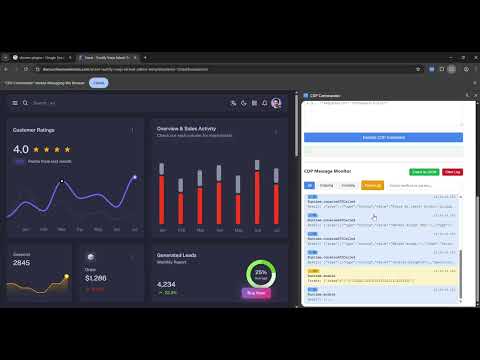
CDP-Commander is a purpose-built developer utility that provides a structured interface for interacting with the Chrome DevTools Protocol. The extension enables developers, automation engineers, and QA teams to execute CDP commands directly against the active tab or specific frames, accelerating debugging, troubleshooting, and verification workflows. The extension does not collect, transmit, or store any personal or sensitive user data. All execution happens locally within the user’s browser and is explicitly triggered by the user. Key Capabilities * Execute any Chrome DevTools Protocol command on the active tab. * Target and inspect individual frames within complex web applications. * Retrieve DOM, network, console, and runtime information for diagnostics. * Manage multiple tabs and generate session-level logs. * Export command logs for audit or analysis. * Optional side-panel interface for real-time command execution. CDP-Commander is intended for advanced users and developer environments. It is not designed for automation of end-users’ browsing activity and does not operate autonomously. All actions are explicitly triggered by the user.
0 out of 5No ratings
Details
- Version1.2
- UpdatedDecember 17, 2025
- Offered byAjoe Alex
- Size32.68KiB
- LanguagesEnglish
- Developer
Email
ajoealex316@gmail.com - Non-traderThis developer has not identified itself as a trader. For consumers in the European Union, please note that consumer rights do not apply to contracts between you and this developer.
Privacy

This developer declares that your data is
- Not being sold to third parties, outside of the approved use cases
- Not being used or transferred for purposes that are unrelated to the item's core functionality
- Not being used or transferred to determine creditworthiness or for lending purposes