

StatusPulse — Keep Teams & Slack Always Available

Overview
Keep your Microsoft Teams and Slack status green and Available — never Away or Idle. Runs on a schedule, 100% local.
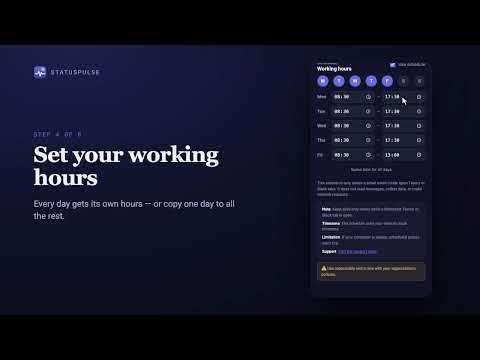
StatusPulse is a lightweight Chrome and Edge extension that keeps your Microsoft Teams and/or Slack presence status "Available" (green) instead of dropping to "Away" or "Idle" — while you're still actually working, just not touching the mouse or keyboard for a while. Enable either platform, or both at once. It works by periodically nudging each platform's own activity/idle detection with a small, harmless signal on a schedule you control. No bots, no fake clicks inside Teams or Slack themselves — just enough activity that the tab doesn't look abandoned. FEATURES • On/off toggle — pause or resume keeping your status active any time • Independent Microsoft Teams and Slack toggles — enable one or both • Live status cards showing how many Teams/Slack tabs are currently open, plus a one-click "Open Teams/Slack Web" button when none are • Configurable activity interval (every 1–30 minutes) so you control how often the presence pulse fires • Per-day working-hours schedule — each day gets its own on/off toggle and its own start/end time, plus a "same time for all days" shortcut • "Test now" button to confirm the pulse is working immediately, no waiting for the next scheduled run • Works with teams.microsoft.com and teams.live.com (work/school and personal Microsoft accounts) and app.slack.com / *.slack.com • Available in English, German, Bengali, French, and Dutch • Everything runs and stays on your device — no account, no server, no setup wizard PRIVACY StatusPulse does not collect any data, does not make network requests, and does not read the content of any page — Teams or Slack messages, calls, and files stay completely untouched. Your settings are stored locally in the browser via chrome.storage.local; nothing is ever synced or sent anywhere. Full privacy policy: https://gist.github.com/rifatwahid/3b7558398e6cd29793c61128a8a78613 DISCLAIMER StatusPulse is an independent, unofficial utility. It is not affiliated with, endorsed by, or sponsored by Microsoft or Slack Technologies. "Microsoft Teams" is a trademark of Microsoft Corporation. "Slack" is a trademark of Slack Technologies, LLC.
0 out of 5No ratings
Details
- Version1.1.1
- UpdatedOctober 28, 2026
- Offered byRifat Wahid Alif
- Size39.39KiB
- Languages5 languages
- Developer
Email
rifat3280@gmail.com - Non-traderThis developer has not identified itself as a trader. For consumers in the European Union, please note that consumer rights do not apply to contracts between you and this developer.
Privacy

This developer declares that your data is
- Not being sold to third parties, outside of the approved use cases
- Not being used or transferred for purposes that are unrelated to the item's core functionality
- Not being used or transferred to determine creditworthiness or for lending purposes
Support
For help with questions, suggestions, or problems, visit the developer's support site