

Archive Restore for ChatGPT

Overview
Bulk-unarchive your archived ChatGPT chats with rate-limit-safe pacing. Runs locally in your chatgpt.com tab. Unofficial.
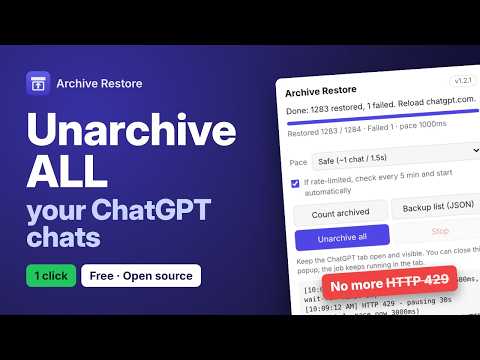
Accidentally hit "Archive all" in ChatGPT? It happens. Then you find out there's no "Unarchive all" button to undo it. This extension fixes that. It brings back every archived chat in your account, so they show up in your sidebar again. HOW TO USE IT 1. Open chatgpt.com and log in. 2. Click the extension and hit "Count archived" to see how many chats you have. Nothing changes yet. 3. (Optional) Click "Backup list" to save a list of your chat titles, just in case. 4. Click "Unarchive all" and let it run. 5. Refresh ChatGPT. Your chats are back. NO MORE "TOO MANY REQUESTS" Most tools try to restore everything at once, and ChatGPT blocks them with a "Too many requests" error. This one takes it slow on purpose. If ChatGPT says "slow down", it waits, then picks up again on its own. Already blocked? Leave the box ticked and it checks once every 5 minutes, then starts by itself when you're clear. You can close the popup and it keeps working in the ChatGPT tab. If you stop it halfway, just run it again and it carries on from where it left off. YOUR DATA STAYS WITH YOU • It only talks to chatgpt.com, using the login you already have • It never reads your messages, only the list of archived chats • No servers, no tracking, no analytics • Asks for just two permissions: access to chatgpt.com, and running its script when you click a button • The code is open for anyone to check: https://github.com/vaibhavmanch3kar/chatgpt-archive-restore A FEW TIPS • Keep the ChatGPT tab open and on screen while it runs. Chrome slows down background tabs. • Close other ChatGPT tabs and turn off similar extensions. They all share the same limit. • Got a lot of chats? Grab a coffee. Going slow is what keeps it from getting blocked. PLEASE NOTE This is a personal, unofficial tool. It isn't made by, linked to, or endorsed by OpenAI. "ChatGPT" is OpenAI's trademark, used here only to say what the extension works with. It relies on how chatgpt.com works today, so if OpenAI changes something, it may stop working until it's updated. If something breaks, let me know on GitHub.
0 out of 5No ratings
Details
- Version1.2.1
- UpdatedOctober 23, 2026
- Size20.23KiB
- LanguagesEnglish
- Developer
Email
vaibhav2815@gmail.com - Non-traderThis developer has not identified itself as a trader. For consumers in the European Union, please note that consumer rights do not apply to contracts between you and this developer.
Privacy

Archive Restore for ChatGPT has disclosed the following information regarding the collection and usage of your data. More detailed information can be found in the developer's privacy policy.
Archive Restore for ChatGPT handles the following:
This developer declares that your data is
- Not being sold to third parties, outside of the approved use cases
- Not being used or transferred for purposes that are unrelated to the item's core functionality
- Not being used or transferred to determine creditworthiness or for lending purposes