


Overview
Set your unit status, send a panic, respond to pending calls and get notified about new ones in CDE CAD.
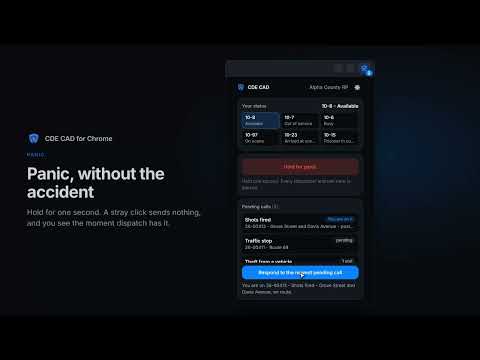
CDE CAD for Chrome puts your unit in the browser toolbar. Set your status, send a panic, and see and respond to your community's pending calls without switching to the CAD tab. WHAT IT DOES Status Your current status is shown at the top, with a button for each status code your community has set up. One click changes it on the CAD, the same as setting it on the website. Panic Hold the panic button for one second to alert every dispatcher and unit in your community. A click on its own sends nothing, so it will not go off by accident. When dispatch acknowledges it, you get a notification naming who has it. Pending calls See every active call in your community: the call type, incident number, location, postal and priority, and whether you are on it. The toolbar badge shows how many calls are waiting. Press "Respond to the newest pending call" to attach yourself, en route. Notifications A desktop notification when a new call comes in, when dispatch puts you on a call, and when your panic is acknowledged. Each one can be turned off in the extension's settings. The extension checks every 30 seconds while the browser is open. SIGNING IN Press "Sign in with Discord". A tab opens where you sign in to CDE CAD the way you do on the website, then confirm. The extension never sees your password. It receives a key that can only set and read your status, send a panic, read pending calls and attach you to one. It cannot open records, reports, civilians, settings or anything else on your account. The key appears as "Browser extension" on your CDE CAD account page, where you can revoke it at any time. If your community runs CDE CAD on its own domain, choose "Use a different CAD address" before signing in. The extension asks for permission to reach that one address only. WHAT YOU NEED A CDE CAD account and membership of at least one community. If you are in more than one community, pick which one to follow from the menu at the top of the extension. PRIVACY The extension talks only to the CDE CAD address you signed in to. There are no analytics, no advertising and no third-party services. Signing out removes the key from your browser, and uninstalling removes everything the extension stored.
0 out of 5No ratings
Details
- Version1.0.0
- UpdatedOctober 8, 2026
- Size36.93KiB
- LanguagesEnglish
- DeveloperSharp Blade Holdings LLCWebsite
1209 Mountain Road Pl NE Ste N Albuquerque, NM 87110-7825 USEmail
support@cdecad.comPhone
+1 765-328-1445 - TraderThis developer has identified itself as a trader per the definition from the European Union and committed to only offer products or services that comply with EU laws.
- D-U-N-S149897350
Privacy

CDE CAD has disclosed the following information regarding the collection and usage of your data. More detailed information can be found in the developer's privacy policy.
CDE CAD handles the following:
This developer declares that your data is
- Not being sold to third parties, outside of the approved use cases
- Not being used or transferred for purposes that are unrelated to the item's core functionality
- Not being used or transferred to determine creditworthiness or for lending purposes
Support
For help with questions, suggestions, or problems, visit the developer's support site