

Chat Exporter Pro - Save Messenger & AI Chats

Overview
Export Messenger, WhatsApp, ChatGPT and Gemini chats as PDF/CSV, with advanced media, files and links ZIP export.
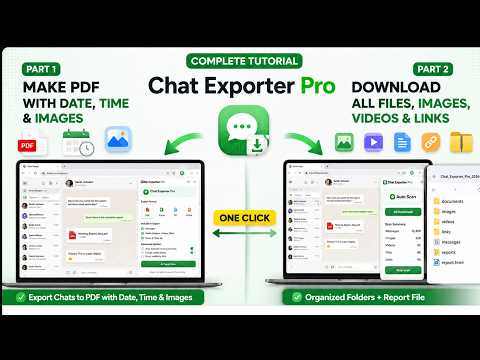
Export and back up Messenger, WhatsApp Web, ChatGPT and Google Gemini conversations as PDF, CSV or organized ZIP files. Chat Exporter Pro helps you preserve complete chat histories with messages, dates, timestamps, images, videos, documents and shared links. Everything is processed directly inside your browser, so your private conversations are not uploaded to our servers. Whether you need to save personal memories, archive client conversations, preserve important business discussions or organize AI research, Chat Exporter Pro gives you a faster and more structured alternative to taking hundreds of screenshots or downloading files one by one. SUPPORTED PLATFORMS • Facebook Messenger • Messenger.com • WhatsApp Web • ChatGPT • Google Gemini EXPORT CHATS TO PDF Turn your conversations into clean, readable PDF files. Depending on the supported platform and available chat data, PDF exports can include: • Messages in their original order • Sender and participant information • Dates and timestamps • Left and right chat-bubble alignment • Profile images where available • Images placed with the related messages • Selected message ranges • Organized conversation formatting PDF export is useful for personal archives, client records, project documentation and preserving important conversation history. EXPORT MESSAGES TO CSV Download chat messages in a structured CSV format for: • Client and customer records • Business communication history • Order and payment discussions • Feedback collection • Research and analysis • Spreadsheet-based organization CSV exports make it easier to filter, search, sort and review large conversations. COMPLETE CHAT AND MEDIA BACKUP Create organized ZIP backups containing detected chat content and shared resources. Depending on the conversation, a ZIP export can include: • Message history • CSV records • Text reports • Images • Videos • Documents • Shared files • Website links • Export summary reports Files are organized into separate folders so you do not need to download every item manually. AUTOMATIC CHAT LOADING Long conversations often require repeated scrolling to reveal older messages. Chat Exporter Pro can automatically load and scan older parts of supported conversations, helping you collect more of the chat without manually scrolling for hours. You can view live progress while the extension: • Loads older messages • Detects text and media • Tracks collected content • Prevents duplicate entries • Prepares the final export BUILT FOR LARGE CONVERSATIONS Exporting several years of messages can use significant browser memory. Chat Exporter Pro includes a part-by-part export system designed to handle large conversations more safely. For supported exports, the extension can: • Process messages in smaller sections • Create separate export parts • Reduce browser memory pressure • Prevent unnecessary duplicate files • Stop an active scan • Resume the export process later • Show current progress and status Very large media files may be skipped and recorded in the export report to help prevent browser freezing or failed downloads. SMART MESSAGE TRACKING The extension tracks detected conversation content while you browse and scan. This helps preserve messages from websites that dynamically load and remove content from the visible page. Tracked-message features may include: • Message previews • Sender information • Message position tracking • Duplicate protection • Navigation back to detected messages • Selection of specific message ranges SAVE IMAGES, VIDEOS, FILES AND LINKS Chat Exporter Pro is more than a basic text exporter. It can detect and organize supported resources shared inside conversations, including: • Photos and images • Videos • Documents • Downloadable files • Shared links This is especially useful when important files and media are spread across months or years of conversation history. USE CASES PERSONAL CHAT ARCHIVES Preserve meaningful conversations, family memories, photos, videos and shared files in an offline format. BUSINESS AND CLIENT RECORDS Save customer requirements, order discussions, payment confirmations, feedback, project instructions and shared documents. IMPORTANT CONVERSATION RECORDS Organize and preserve important messages for personal, administrative, business or legal reference. Exported files help retain conversation history, but they do not independently certify or authenticate legal evidence. AI RESEARCH AND STUDY Save useful ChatGPT and Gemini conversations containing research, explanations, study notes, code, prompts and project discussions. MEDIA AND FILE COLLECTION Download detected images, videos, documents and links from supported conversations into organized folders. PRIVACY-FIRST PROCESSING Your conversations are private. Chat Exporter Pro processes chat content directly inside your browser. We do not operate a cloud service that stores or analyzes the contents of your conversations. Chat text and detected media are processed locally for export. Internet access may still be used for normal extension functions such as license activation, payment verification, website access and downloading externally hosted resources. FREE VERSION The free version is suitable for testing the core PDF export experience. Free access may include: • Export of up to 100 supported social-chat messages • Limited AI chat export • PDF export with a watermark • Text-focused export features Usage limits may vary by platform and extension version. PRO LIFETIME UPGRADE Upgrade to Pro to unlock the complete backup experience. Pro features may include: • Unlimited supported message exports • Complete ZIP backup • Image and media extraction • Video and document collection • CSV export • Shared-link export • Automatic chat scanning • Large conversation export • Selected message ranges • Watermark-free output • Priority customer support The Pro license is available as a one-time lifetime upgrade. Please check the official website or extension interface for the current price and payment options. DATE AND TIME COMPATIBILITY Chat Exporter Pro reads the date and time information displayed by supported websites. Facebook Messenger, WhatsApp and AI platforms may display timestamps differently depending on language, region and interface layout. For the most reliable detection: • Use English (United States) as the Facebook or Messenger interface language • Set English (United States) as a preferred Chrome language • Keep your actual timezone unchanged • Reload the conversation after changing language settings • Make sure the required date or time is visible inside the chat If date or time is not detected correctly, contact support with a short screen recording showing the visible timestamp format. IMPORTANT NOTES • Website layouts can change over time and may temporarily affect message or media detection. • Export results depend on the content currently available and loaded in the browser. • Some protected, expired or externally hosted media may not be downloadable. • Very large files may be skipped to protect browser performance. • Always review important exports before relying on them as permanent records. WHY CHOOSE CHAT EXPORTER PRO? • Supports both social and AI conversations • Exports messages to PDF and CSV • Creates organized ZIP backups • Downloads detected images, videos and files • Handles long conversation histories • Includes automatic loading and scanning • Supports stop and resume • Helps prevent duplicate messages and files • Processes private chat content locally • Designed for personal, business and research use Stop taking endless screenshots and downloading shared files one by one. Install Chat Exporter Pro and create organized, offline backups of your Messenger, WhatsApp, ChatGPT and Gemini conversations.
4.8 out of 516 ratings
Details
- Version4.3.39
- UpdatedOctober 21, 2026
- Size1.86MiB
- LanguagesEnglish
- DeveloperMahdi HasanWebsite
Bree kaliakair Singair Manikganj 1820 BDEmail
mahdihasan.mhd1@gmail.comPhone
+880 1622-823685 - TraderThis developer has identified itself as a trader per the definition from the European Union and committed to only offer products or services that comply with EU laws.
Privacy

This developer declares that your data is
- Not being sold to third parties, outside of the approved use cases
- Not being used or transferred for purposes that are unrelated to the item's core functionality
- Not being used or transferred to determine creditworthiness or for lending purposes
Support
For help with questions, suggestions, or problems, please open this page on your desktop browser