

Clip Insights
5 ratings
)
Overview
Clip Insights: capture video screenshots, timestamped notes, AI summaries, key points, and chat across learning platforms.
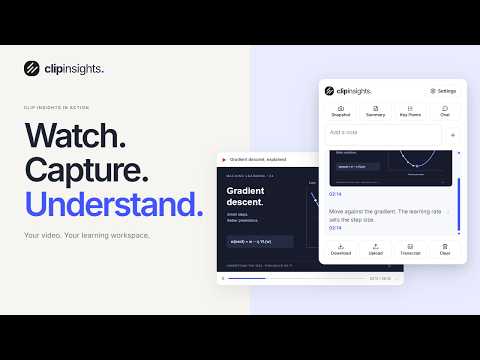
Turn YouTube videos into study notes. Capture screenshots, explore ideas with AI, and export your learning as a PDF. Make every video worth keeping. Clip Insights brings a study workspace to YouTube. Save the diagram that makes an idea click. Write down an explanation in your own words. Ask a follow-up question while the lesson is still in front of you. Keep your thinking beside the video, then take it with you. CAPTURE WHAT MATTERS Save screenshots of slides, diagrams, code examples, and other useful frames. Add your own notes as you watch. Screenshots and notes keep their video timestamps, so you can jump back to the exact moment when you need the context. SEE THE MAIN IDEAS Generate an AI summary and key points from the video's available transcript. Get an overview before taking your own notes, or revisit the main takeaways after a lesson. You can also copy the available transcript for reference. WORK THROUGH A QUESTION Ask Clip Bot about the video. Request a simpler explanation, explore a concept, or ask a follow-up question. Responses use the available transcript as context to help you work through the material. TAKE YOUR NOTES WITH YOU Export screenshots, notes, summaries, and key points together as a PDF. Keep a copy for revision or share it with a study partner. Sign in to upload PDFs to your Clip Insights account and organize saved files into folders in the web app. START WITH YOUR NEXT VIDEO Install Clip Insights, open a YouTube video, and start capturing frames or writing notes in the study panel. Sign in when you want to use AI features or upload a PDF to your account. AVAILABILITY AND STORAGE Screenshot capture, notes, and PDF downloads work without an account, within guest limits. AI features and cloud uploads require sign-in and internet access. Usage and storage allowances depend on your plan. AI features require an available transcript and may use only part of a longer video. Responses can contain mistakes; check important details against the original material. Local study material is cleared after five days and is not automatically backed up. Download a PDF or upload it to your account to keep your work. AI requests send relevant transcript text and your questions to our backend and AI providers for processing. Uploaded PDFs are stored in your account. See our privacy policy for details. Website: https://clipinsights.org Web app: https://app.clipinsights.org Support: https://clipinsights.org/contact Privacy: https://clipinsights.org/privacy
5 out of 55 ratings
Details
- Version4.0.5
- UpdatedOctober 31, 2026
- FeaturesOffers in-app purchases
- Offered byClip Insights
- Size1019KiB
- LanguagesEnglish
- Developer
Email
zubayrahmad0308@gmail.com - Non-traderThis developer has not identified itself as a trader. For consumers in the European Union, please note that consumer rights do not apply to contracts between you and this developer.
Privacy

Clip Insights has disclosed the following information regarding the collection and usage of your data. More detailed information can be found in the developer's privacy policy.
Clip Insights handles the following:
This developer declares that your data is
- Not being sold to third parties, outside of the approved use cases
- Not being used or transferred for purposes that are unrelated to the item's core functionality
- Not being used or transferred to determine creditworthiness or for lending purposes
Support
For help with questions, suggestions, or problems, please open this page on your desktop browser