


Overview
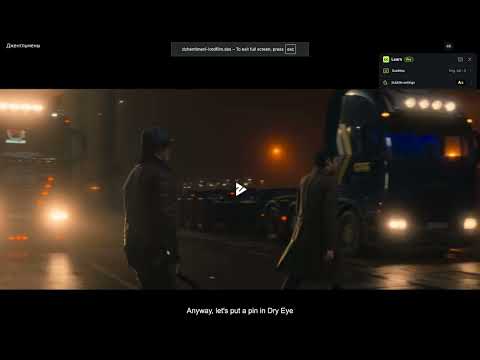
Click any subtitle to get an AI-powered, in-context translation — and turn the videos you watch into English practice.
CC Learn — Learn English from Video Subtitles Don't just translate subtitles. Understand what they mean in the scene. CC Learn turns the subtitles in videos you already watch into an interactive language-learning tool. Click any word in a subtitle to instantly see its translation, the expression it belongs to, and the translation of the full subtitle line. When a word has a less obvious meaning, use AI Context to understand what it actually means in that specific scene. UNDERSTAND WORDS IN CONTEXT A word can mean completely different things depending on the sentence. For example: "Wanna grab a beer tonight?" "I'm down." A literal translator may interpret "down" as "below" or "sad." In this context, however: "I'm down" → "I'm in / I'm up for it." CC Learn uses the surrounding subtitles to help identify the meaning that fits the conversation. RECOGNIZE COMPLETE EXPRESSIONS Sometimes clicking a single word isn't enough. For example: "I can't put up with this anymore." Click "up," and CC Learn recognizes that it belongs to "put up with" — meaning "tolerate." The extension can help with: - phrasal verbs - idioms - slang - fixed expressions - conversational English - words with multiple meanings STANDARD TRANSLATION Get a quick translation without leaving the video. For a selected word, CC Learn shows: - word translation - the expression it belongs to — for example, "put up with" → "tolerate" - full subtitle translation This makes it easy to understand the sentence without constantly switching to another translator or dictionary. AI CONTEXT Some phrases can't be understood reliably from a dictionary alone. Tap "Try AI" when you want a deeper explanation. AI Context can explain: - what the expression means in this exact scene - why a literal translation may be wrong - whether it's slang, an idiom, or a phrasal verb - related expressions and example sentences For example: "I'm down" → "I'm in / I'm up for it" Related: "I'm in," "Count me in," "Sounds good" AI Context uses the selected word together with the subtitle around it, instead of translating the word in isolation. LEARN WHILE YOU WATCH CC Learn is designed to stay out of the way. Watch your video normally. When you see something interesting: click → understand → continue watching. No need to copy subtitles, open another tab, or search through a dictionary. SAVE USEFUL WORDS AND EXPRESSIONS Save translations you want to remember. Your library can include the selected word, the complete expression, its translation, the original subtitle, a contextual explanation, and the video where you found it — so you can build a vocabulary from content you actually watch. BUILT FOR REAL ENGLISH Textbook translations often miss the way people actually speak. CC Learn is especially useful for conversational expressions such as "I'm good," "You nailed it," "That's on me," and "Don't sweat it." Instead of treating every word independently, CC Learn uses the surrounding sentence to understand the intended meaning. FREE TO USE, WITH OPTIONAL AI Standard translation is available for everyday use. AI Context is available when you need deeper contextual understanding, and your available AI usage is shown directly in the extension so you always know how much you have left. Some advanced functionality, including select Premium features, may require a subscription. MULTIPLE LANGUAGES CC Learn is built to support multiple source and translation languages. Language availability may vary depending on the translation method used. PRIVACY CC Learn sends the subtitle text you select, together with its surrounding context, to our AI service to generate the requested translation. We process only the information needed to provide that translation and related learning features. Saved learning data is used to show your translation history and saved-word library. For details on data processing, see our Privacy Policy on the CC Learn website. TRANSLATION ACCURACY Translations and AI explanations are generated automatically. They are designed to help with language learning and contextual understanding, but may occasionally be inaccurate or miss nuance. Turn the videos you already watch into English practice.
0 out of 5No ratings
Details
- Version1.0.1
- UpdatedOctober 20, 2026
- FeaturesOffers in-app purchases
- Size1.55MiB
- Languages9 languages
- DeveloperWebsite
Email
support@cclearn.app - Non-traderThis developer has not identified itself as a trader. For consumers in the European Union, please note that consumer rights do not apply to contracts between you and this developer.
Privacy

CC Learn — Subtitle Translator has disclosed the following information regarding the collection and usage of your data. More detailed information can be found in the developer's privacy policy.
CC Learn — Subtitle Translator handles the following:
This developer declares that your data is
- Not being sold to third parties, outside of the approved use cases
- Not being used or transferred for purposes that are unrelated to the item's core functionality
- Not being used or transferred to determine creditworthiness or for lending purposes
Support
For help with questions, suggestions, or problems, visit the developer's support site