


Overview
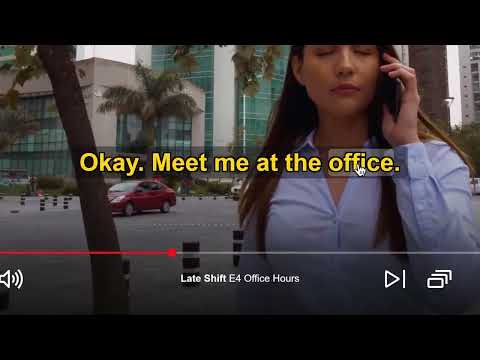
Turns Netflix English [CC] subtitles into regular subtitles in real time, without all caps or sound tags.
CC Converter turns the English [CC] subtitles on Netflix into regular, easy-to-read subtitles, live, while you watch. Closed captions are written for viewers who can't hear the audio, so they come in all caps, with sound descriptions and speaker names. CC Converter rewrites each line in normal sentence case, removes the sound tags and speaker labels, and puts off-screen voices in italics. Make the subtitles yours - Choose the font, size, weight, color, outline and background - Drag the subtitles anywhere on the picture - Open the settings from a button in the video player, with a live preview Translate while you watch - Pause, click a word and see its translation in context, along with the whole line - Translation runs on your device with the browser's built-in translator Private by design - No account, no analytics, no tracking - Your settings stay in your browser - Other subtitle tracks are never modified CC Converter is an independent project and is not affiliated with Netflix.
0 out of 5No ratings
Details
- Version1.14.0
- UpdatedNovember 7, 2026
- Size460KiB
- LanguagesEnglish (United States)
- DeveloperWebsite
Email
contact@zoltex.dev - Non-traderThis developer has not identified itself as a trader. For consumers in the European Union, please note that consumer rights do not apply to contracts between you and this developer.
Privacy

This developer declares that your data is
- Not being sold to third parties, outside of the approved use cases
- Not being used or transferred for purposes that are unrelated to the item's core functionality
- Not being used or transferred to determine creditworthiness or for lending purposes