

Cat Gatekeeper

Overview
Spend too long on social media? A cat hijacks your screen. The cutest forced-break app.
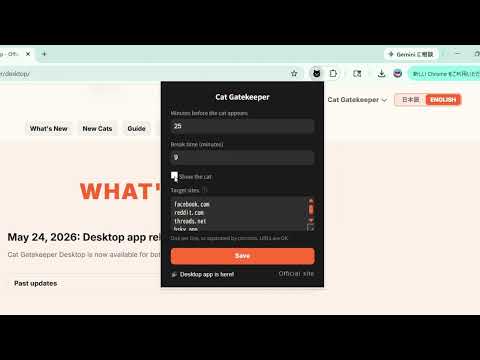
The official versions of Cat Gatekeeper are only those linked from this page and the official website. Please be careful of apps or websites with similar names. The source code is available for inspection so you can see how the extension works. https://github.com/zokuzoku/cat-gatekeeper-source Note: Unauthorized copying, modification, or redistribution of source code, videos, images, icons, and other visual assets is prohibited. Please note that usage statistics may not be reflected immediately after an update. If this happens, please refresh the page. ーーーーーーーーーーーーーーーーーーー ★★★ IMPORTANT ★★★ In ver. 1.2.2, we have updated how browsing time is tracked. Since time is now carried over even when you switch tabs between target sites, the cat may appear more frequently than before. Please adjust the "time until the cat appears" from the menu if needed. For more details on these changes, please see "How Time Tracking Works" below. ーーーーーーーーーーーーーーーーーーー ■ Main Changes in ver. 1.2.2 * Browsing time on target sites now carries over when switching tabs or windows. * Break time now continues even if you reload the page or reopen it in another tab. * The menu now displays the browsing time for each target site. * Added checkboxes to easily select major sites. * YouTube and YouTube Shorts can now be configured and tracked separately. * Added new cats and introduced a shuffle system to prevent the same cat from appearing consecutively. * Pressing and holding the button below the cat now allows you to dismiss it. * The cat now appears even when watching videos in full screen. * Fixed minor bugs and improved overall performance. ーーーーーーーーーーーーーーーーーーー Social media is just too hard to stop checking, isn't it? 💦🥵 What you need isn't more willpower — it's a cat that forces its way onto your screen!! You know that cat who always shows up right when you're trying to work? 🐈️ We've recreated that classic cat-owner experience in your browser. Oh well, they're too cute to stay mad at. Let's face it — humans are just servants to their cats. We are powerless against their charm. The supreme beings. The ultimate fluffballs. Let their adorableness heal you while you take a proper break. ■ Who this is for * The scrolling won't stop * You suddenly realize an hour has passed * Willpower alone just isn't cutting it ■ How to use 1. Click the puzzle piece icon next to the address bar in the top-right corner of your browser, then select Cat Gatekeeper to open the menu. 2. Set your usage limit (default: 10 min) 3. Set your break time (default: 5 min) 4. Set your favorite sites (default: major social media sites) 5. When time's up, a cat appears 6. Rest until the countdown ends Note: If you need to dismiss the cat, you can do so by using the button below the cat or from the menu screen. ■ How Time Tracking Works (Updated in ver. 1.2.2) *Time is measured only while you are actually viewing the designated sites. *Even if you open the same site in multiple tabs, they are counted as a single combined time. *If you switch tabs or apps, tracking resumes from where you left off if you return within 30 minutes. *If you do not view the site for 30 minutes or more, the browsing time resets. *Once a break ends, the counter starts over from 0. *You can check your current tracked time from the menu. *YouTube and YouTube Shorts are counted separately. ■ Supported Sites Major social media platforms are registered by default. You can toggle them on or off using the checkboxes. Additionally, you can add or change target sites from the menu screen. * Page access permission is used solely to display the break overlay (cat overlay). * No data is collected or transmitted externally. * Free, no ads Get the desktop app for use beyond the browser https://zokuzoku.github.io/cat-gatekeeper/desktop/
4.6 out of 5738 ratings
Details
- Version1.2.2
- UpdatedAugust 8, 2026
- Size38.77MiB
- Languages2 languages
- DeveloperWebsite
Email
zokuzoku.app@gmail.com - Non-traderThis developer has not identified itself as a trader. For consumers in the European Union, please note that consumer rights do not apply to contracts between you and this developer.
Privacy

This developer declares that your data is
- Not being sold to third parties, outside of the approved use cases
- Not being used or transferred for purposes that are unrelated to the item's core functionality
- Not being used or transferred to determine creditworthiness or for lending purposes
Support
For help with questions, suggestions, or problems, visit the developer's support site