

CardLens — MTG Card Lookup

Overview
Identify Magic: The Gathering cards in videos, images and text. Preview supported links on hover and search by name.
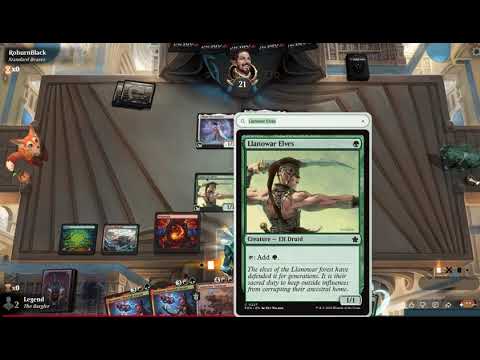
Look up Magic: The Gathering cards without leaving what you’re watching or reading. CardLens brings the full card image, including its rules text, onto the current webpage. - **Videos, streams and images:** Point at a readable English card name and press ⌘ Shift E on Mac or Ctrl Shift E on Windows/Linux. CardLens reads the name locally and opens the matching card. This includes MTG Arena gameplay shown in browser videos and streams. - **Webpage text:** Point at a card name, or select it, and press the same shortcut. CardLens tries to match the name under your cursor. - **Supported references:** Simply hover over a name in double brackets, such as [[Lightning Bolt]], or a supported Scryfall, Gatherer or MTG Salvation card link. No shortcut is needed for these references. If recognition misses, type a card name in the overlay and choose a suggestion. Change your shortcut or disable CardLens on the current website from the extension popup. Close the overlay with Esc, a click outside, or its close button. Free to use, with no account required. **Privacy:** Recognition and ordinary card-name search run locally with bundled software and card data. Screenshots are processed in memory and never uploaded. Card images load from Scryfall; some supported references also send a card identifier, set/collector reference, or set-qualified name to Scryfall to resolve a printing. Uncached images and those reference lookups need an internet connection. Usage data and error reporting are on by default in releases configured for analytics. Turn off “Share usage data and error reports” in Settings & privacy to opt out without losing recognition or search. Reports go to PostHog and exclude screenshots, card names, search text and website addresses. Firefox additionally requires its optional technical and interaction data permission. Read the full privacy policy: https://tjasek.com/cardlens/privacy **Limitations:** CardLens reads names, not artwork. Small, blurred, rotated or partly hidden English titles may not match; manual search remains available. It works on ordinary desktop webpages where browser access is allowed, not inside the standalone MTG Arena app, browser-restricted pages, protected video, or native picture-in-picture windows. CardLens is an unofficial fan project, unaffiliated with Wizards of the Coast. Magic card names, text and imagery belong to their respective rights holders.
0 out of 5No ratings
Details
- Version0.1.0
- UpdatedOctober 11, 2026
- Offered byTJasek
- Size32.81MiB
- LanguagesEnglish (United States)
- DeveloperTomasz Jasek
Sihlberg 28 Zurich 8002 CHEmail
tomasz@tjasek.com - Non-traderThis developer has not identified itself as a trader. For consumers in the European Union, please note that consumer rights do not apply to contracts between you and this developer.
Privacy

This developer declares that your data is
- Not being sold to third parties, outside of the approved use cases
- Not being used or transferred for purposes that are unrelated to the item's core functionality
- Not being used or transferred to determine creditworthiness or for lending purposes
Support
For help with questions, suggestions, or problems, visit the developer's support site