

Carbon.Crane – Webpage Carbon Scanner
3 ratings
)
Overview
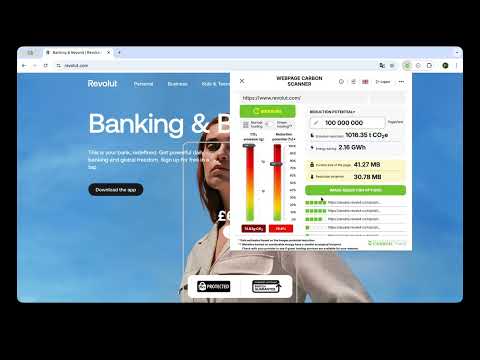
Make webpages lighter, faster and more efficient. Scan page weight, CO₂e impact and image optimization potential in one click.
Carbon.Crane Webpage Scanner is a beta Chrome extension for people who publish, edit or manage webpages. No DevTools needed — with one click, it scans the active webpage and shows what makes it heavy, how much reduction potential it has, and which images are the easiest place to start. It is designed for content editors, ecommerce teams, marketers, bloggers, agencies and website owners who want faster, lighter and more sustainable webpages — without opening developer tools. What you can measure • Page size • CO₂e emissions per pageview • Immediate reduction potential • Estimated energy and CO₂e savings at selected pageview volumes • Image-level optimization opportunities Why it is different Most online tools ask you to copy and paste a URL into a separate checker. Carbon.Crane works directly in your browser, on the page you are viewing or editing. The scanner comes to the page — not the page to the scanner. Start with the easiest waste: images Oversized images are often one of the simplest ways to reduce page weight. Carbon.Crane identifies images with optimization potential and shows how much data could be reduced. This helps you focus on the lowest-hanging fruit first. Built for no-code users You do not need to be a developer to understand what makes a page heavy. Use it before publishing or updating: • Product pages • Landing pages • Articles • Blog posts • Campaign pages • Corporate website pages Developers can also use it as a quick pre-publish or QA check before deeper performance work. Beta access This is a beta version. You can use it for free while we improve the tool. In return, we may ask for short feedback about the results, the interface and the features that would make the extension more useful in your workflow. How to use it 1. Add the extension to Chrome. 2. Open any webpage you want to check. 3. Click the Carbon.Crane icon in your browser. 4. Scan the active page. 5. Review page size, CO₂e impact, reduction potential and image-level optimization opportunities. Chrome’s official installation flow is: open the Chrome Web Store, select the extension, click Add to Chrome, review the requested permissions, then click Add extension. The extension requires your name and email address for access, but no other personal data is needed to use its core functionality. The analysis runs only on publicly accessible page data from the active tab. Results are indicative estimates designed to support optimization decisions.
5 out of 53 ratings
Details
- Version1.3.2
- UpdatedJuly 30, 2026
- FeaturesOffers in-app purchases
- Offered byCarbon Crane
- Size138KiB
- LanguagesEnglish
- DeveloperCarbon.Crane Zrt.
Munkácsy utca 10/2 Budaörs 2040 HUEmail
info@carboncrane.ioPhone
+36 20 577 7577 - TraderThis developer has identified itself as a trader per the definition from the European Union and committed to only offer products or services that comply with EU laws.
- D-U-N-S301664455
Privacy

Carbon.Crane – Webpage Carbon Scanner has disclosed the following information regarding the collection and usage of your data. More detailed information can be found in the developer's privacy policy.
Carbon.Crane – Webpage Carbon Scanner handles the following:
This developer declares that your data is
- Not being sold to third parties, outside of the approved use cases
- Not being used or transferred for purposes that are unrelated to the item's core functionality
- Not being used or transferred to determine creditworthiness or for lending purposes